> ## Documentation Index
> Fetch the complete documentation index at: https://routerdocs.hivenet.com/llms.txt
> Use this file to discover all available pages before exploring further.
# Policy gates
> Diagnose the seven routing gates and apply practical thresholds for health, capacity, latency, engine, and hardware signals.
Every local routing step passes its candidate agents through seven sequential gates before Hivenet Router ranks and selects one.
The gates answer a series of increasingly specific questions:
1. Does any agent serve the requested model?
2. Is the agent and its backend healthy?
3. Does it serve the required workload capability?
4. Does its metadata match the policy?
5. Has it already failed this request within the current step?
6. Does it have free declared capacity?
7. Does it pass the configured live metric thresholds?
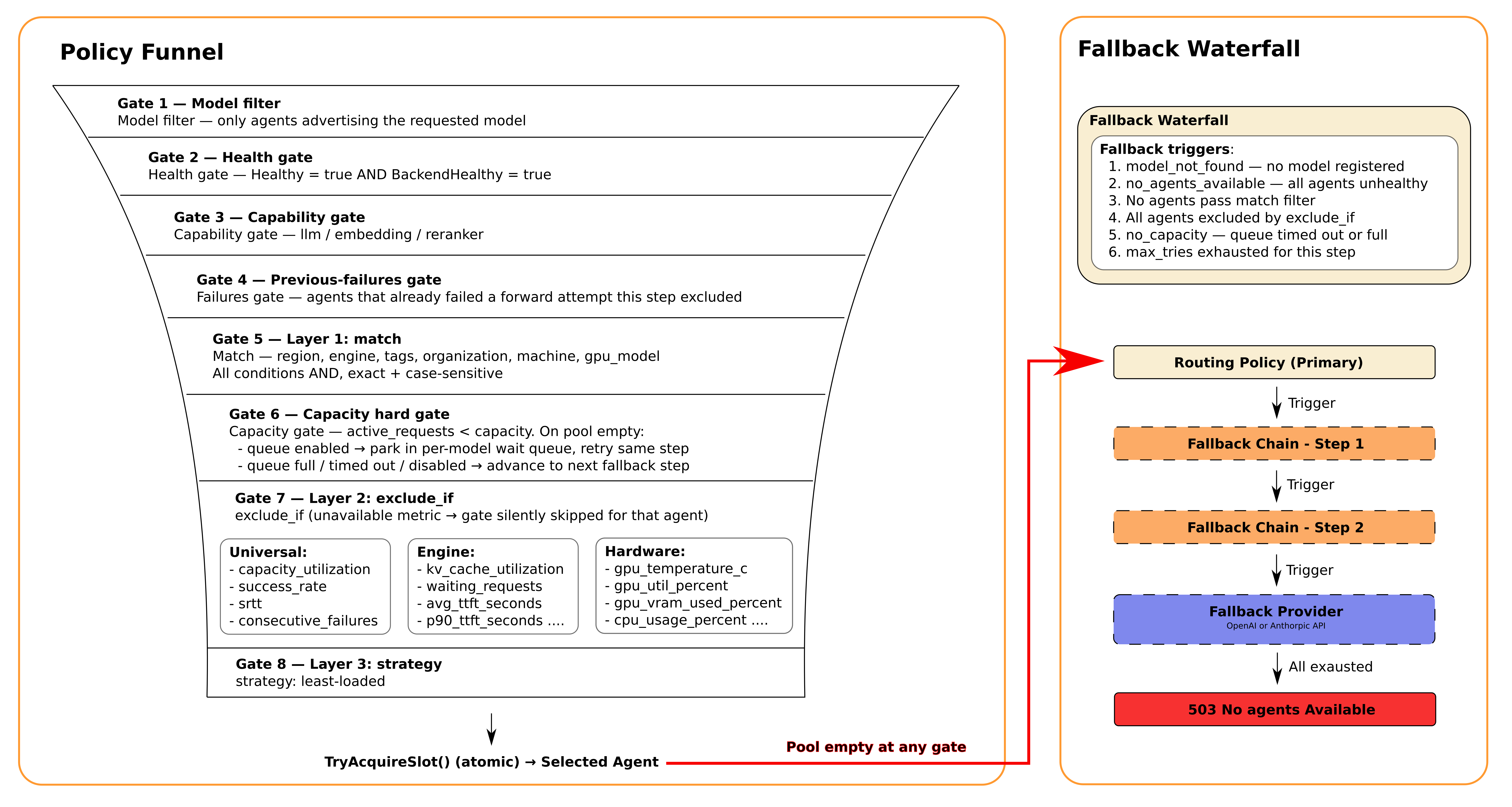 If a gate removes every remaining agent, that policy step is exhausted. The capacity gate is the exception: when otherwise eligible agents exist but are full, Hivenet Router can wait in the per-model capacity queue before advancing to the next fallback step.
Ranking happens after the seven gates. The current `least-loaded` strategy orders only the agents that survive the entire funnel.
## Gate summary
| Gate | Name | What it checks |
| ---: | --------------- | ---------------------------------------------------------- |
| 1 | `model_filter` | Agent is registered for the requested model |
| 2 | `health` | Agent and its inference backend are healthy |
| 3 | `capability` | Agent serves `llm`, `embedding`, or `reranker` as required |
| 4 | `match` | Agent metadata satisfies the step’s static filters |
| 5 | `prev_failures` | Agent has not already failed in the current policy step |
| 6 | `capacity` | Active requests are below declared capacity |
| 7 | `exclude_if` | Live metrics do not violate configured thresholds |
The first six gates always apply.
Gate 7 applies only when the policy step contains:
```yaml theme={null}
exclude_if:
```
## Gate 1: Model filter
The model filter creates the initial candidate pool.
Hivenet Router loads agents registered for the exact model name supplied by the client:
```json theme={null}
{
"model": "meta-llama/Llama-3.1-8B-Instruct"
}
```
Model matching is exact and case-sensitive.
This request does not match an agent registered as:
```text theme={null}
meta-llama/llama-3.1-8b-instruct
```
### When the gate drains the pool
Gate 1 fails when no local agent is registered for the requested model.
Later local fallback steps cannot recover by selecting a different model. The requested model remains fixed throughout the local policy chain.
An external provider fallback may still run for an eligible language-model chat request because it can deliberately substitute its configured provider model.
### Diagnose it
List the operator model catalog:
```bash theme={null}
curl \
-H "Authorization: Bearer $HIVENET_ROUTER_ADMIN_API_KEY" \
http://localhost:8080/admin/models \
| jq -r '.data[].id'
```
Check the model registered by each agent:
```bash theme={null}
curl \
-H "Authorization: Bearer $HIVENET_ROUTER_ADMIN_API_KEY" \
http://localhost:8080/admin/routing-table \
| jq '.agents[] | {
peer_id,
model: .metadata.model,
engine: .metadata.engine,
capability: .metadata.capability
}'
```
### Fix it
* Start an agent for the requested model.
* Correct the client’s model name.
* Pin the intended model with the agent’s `--model` setting.
* Give several backend implementations the same public model name when they should participate in one fallback chain.
## Gate 2: Health
An agent passes the health gate only when both of these states are healthy:
```text theme={null}
agent health
backend health
```
The router tracks the agent’s connection and heartbeat state.
The agent reports whether its local inference backend passed the latest backend health check.
### When the gate drains the pool
Gate 2 fails when every agent serving the model is:
* disconnected
* marked unhealthy by the router
* reporting an unhealthy inference backend
* or some combination of these states
### Diagnose it
Check the health summary:
```bash theme={null}
curl \
-H "Authorization: Bearer $HIVENET_ROUTER_ADMIN_API_KEY" \
http://localhost:8080/admin/health \
| jq .
```
Inspect the two health fields separately:
```bash theme={null}
curl \
-H "Authorization: Bearer $HIVENET_ROUTER_ADMIN_API_KEY" \
http://localhost:8080/admin/routing-table \
| jq '.agents[] | {
model: .metadata.model,
peer_id,
agent_healthy: .status.healthy,
backend_healthy: .status.backend_healthy,
last_seen: .status.last_seen
}'
```
### Fix it
* Check the agent process and logs.
* Test the inference backend’s health endpoint locally.
* Confirm that the agent can reach the router’s gRPC and libp2p ports.
* Confirm that the agent can reach the router’s advertised libp2p address.
* Check firewall, NAT, container, and network-policy changes on the outbound agent-to-router path.
* Verify that the router and agent use the same JWT secret.
## Gate 3: Capability
Each agent registers one capability:
```text theme={null}
llm
embedding
reranker
```
The request endpoint determines the required capability.
| Request | Required capability |
| --------------------------- | ------------------- |
| `POST /v1/chat/completions` | `llm` |
| `POST /v1/messages` | `llm` |
| `POST /v1/embeddings` | `embedding` |
| `POST /v1/rerank` | `reranker` |
### When the gate drains the pool
Gate 3 fails when agents exist for the model name, but none serve the required workload type.
For example, an agent registered as:
```text theme={null}
capability=embedding
model=shared-model
```
cannot serve:
```text theme={null}
POST /v1/chat/completions
```
even if the request uses the same model name.
### Diagnose it
```bash theme={null}
curl \
-H "Authorization: Bearer $HIVENET_ROUTER_ADMIN_API_KEY" \
http://localhost:8080/admin/routing-table \
| jq '.agents[] | {
model: .metadata.model,
capability: .metadata.capability,
engine: .metadata.engine
}'
```
### Fix it
* Start the agent with the correct `--capability`.
* Use `llm`, `embedding`, or `reranker` exactly.
* Send the request to the endpoint that matches the agent capability.
* Use distinct public model names when one set of weights is exposed for different workload types.
## Gate 4: Static match
The `match` gate applies the policy step’s static metadata filters.
```yaml theme={null}
match:
engine: vllm
region: EU-France
organization: ml-team
machine: gpu-worker-1
gpu_model: RTX4090
tags:
- production
- high-memory
```
Every non-empty field must match.
All comparisons are exact and case-sensitive.
### Supported fields
| Field | Agent metadata |
| -------------- | ------------------------------------ |
| `engine` | Backend integration |
| `region` | Operator-defined region |
| `organization` | Operator-defined owner or provider |
| `machine` | Stable machine identifier |
| `gpu_model` | GPU identifier reported by the agent |
| `tags` | Operator-defined labels |
For tags, the agent must contain every tag listed by the policy. It may contain additional tags.
### When the gate drains the pool
Gate 4 fails when no remaining agent satisfies every configured field.
A common cause is incomplete agent metadata.
For example, a policy may require:
```yaml theme={null}
match:
engine: vllm
```
while the registered agent reports an empty engine value.
### Diagnose it
The `policy_exhausted` log includes the actual and required values.
For example:
```text theme={null}
routing_policy: gate[4] match [
engine(got="",want="vllm")=2
]
```
This means two candidates reported an empty engine while the policy required `vllm`.
Inspect live metadata:
```bash theme={null}
curl \
-H "Authorization: Bearer $HIVENET_ROUTER_ADMIN_API_KEY" \
http://localhost:8080/admin/routing-table \
| jq '.agents[] | {
model: .metadata.model,
engine: .metadata.engine,
region: .metadata.region,
organization: .metadata.organization,
machine: .metadata.machine,
gpu_model: .metadata.gpu_model,
tags: .metadata.tags
}'
```
### Fix it
* Correct the policy value.
* Correct the agent metadata.
* Check capitalization and punctuation.
* Remove a filter that does not express a real operational requirement.
* Add a later fallback step with deliberately relaxed filters.
## Gate 5: Previous failures
The previous-failures gate removes agents that already produced a forwarding failure during the current policy step.
This prevents Hivenet Router from repeatedly choosing the same unsuccessful agent while other candidates remain.
### Scope of the exclusion
The failed-agent set belongs to one request and one policy step.
It resets when Hivenet Router advances from:
```text theme={null}
routing_policy
```
to a fallback step, or from one fallback step to the next.
An agent that failed in the primary step may therefore become eligible again in a later step when the policies overlap.
### When the gate drains the pool
Gate 5 drains the pool when every otherwise eligible agent has already failed during the current step.
This can happen before `max_tries` is reached when the number of eligible agents is smaller than the configured attempt budget.
For example:
```text theme={null}
Eligible agents: 2
max_tries: 5
```
After both agents fail once, no untried agent remains in the step.
### Diagnose it
Search router logs using the request ID.
Look for forwarding errors before the final exhaustion line:
```text theme={null}
req=
forward_error
policy_exhausted
```
The exhaustion reason may contain:
```text theme={null}
gate[5] prev_failures [prev_failed=2]
```
### Fix it
This gate normally describes the result of earlier failures rather than a configuration problem.
Investigate:
* backend errors
* agent disconnections
* backend overload
* network failures
* request incompatibility across engines
Also check whether later fallback steps overlap completely with the current step. An overlapping fallback may retry the same agents.
## Gate 6: Capacity
The capacity gate compares the agent’s active request count with its declared capacity.
An agent passes when:
```text theme={null}
active requests < declared capacity
```
It fails when:
```text theme={null}
active requests >= declared capacity
```
Capacity is configured on the agent:
```bash theme={null}
--capacity 32
```
### When the gate drains the pool
Gate 6 fails when every remaining agent has used all its declared slots.
This does not necessarily mean the backend is broken. It may be healthy and serving its current workload normally.
### Queue behavior
When eligible agents exist but are full, Hivenet Router can place the request in the per-model capacity queue before advancing to a fallback step.
The default queue depth is:
```text theme={null}
30 waiting requests per model
```
Configure it:
```bash theme={null}
--queue-depth 50
```
Disable it for immediate fallback:
```bash theme={null}
--queue-depth 0
```
### Diagnose it
Inspect active requests and capacity:
```bash theme={null}
curl \
-H "Authorization: Bearer $HIVENET_ROUTER_ADMIN_API_KEY" \
http://localhost:8080/admin/routing-table \
| jq '.agents[] | {
model: .metadata.model,
peer_id,
active_requests: .status.active_requests,
capacity: .metadata.capacity,
capacity_utilization: .status.capacity_utilization
}'
```
The exhaustion log may contain:
```text theme={null}
gate[6] capacity [at_capacity=3]
```
### Fix it
* Add more agents for the model.
* Increase `--capacity` only when the backend and hardware can support more concurrency.
* Lower request duration or backend queue pressure.
* Configure a fallback step with additional infrastructure.
* Disable or reduce queueing when fast failover is preferable.
Agents must declare a positive capacity. The router rejects agent authentication when capacity is zero or negative.
For streaming responses, Hivenet Router releases the capacity slot when response headers arrive, while backend generation can continue. Gate 6 therefore limits routing admission rather than the complete lifetime of active streams.
## Gate 7: Dynamic metric thresholds
The `exclude_if` gate evaluates live operational metrics.
```yaml theme={null}
exclude_if:
kv_cache_utilization:
gt: 0.85
success_rate:
lt: 0.95
gpu_temperature_c:
gt: 82
```
An agent fails Gate 7 when it violates any configured rule.
### Operators
Each field must define exactly one operator:
| Operator | Excludes the agent when |
| -------- | ----------------------------------------------- |
| `gt` | Value is greater than the threshold |
| `gte` | Value is greater than or equal to the threshold |
| `lt` | Value is less than the threshold |
| `lte` | Value is less than or equal to the threshold |
Valid:
```yaml theme={null}
waiting_requests:
gt: 0
```
Invalid:
```yaml theme={null}
waiting_requests:
gt: 0
gte: 1
```
Unknown fields and rules with zero or several operators are rejected when the policy loads.
## Available gate fields
### Universal signals
| Field | Unit | Meaning |
| ---------------------- | -------------------- | ----------------------------------------------------- |
| `capacity_utilization` | Fraction `0.0`–`1.0` | Active requests divided by capacity |
| `success_rate` | Fraction `0.0`–`1.0` | Successful forwards divided by all completed forwards |
| `srtt` | Milliseconds | Smoothed router-agent request time |
| `consecutive_failures` | Count | Failures since the last successful forward |
### Engine signals
| Field | Unit | Meaning |
| ---------------------- | -------------------- | ---------------------------------------- |
| `kv_cache_utilization` | Fraction `0.0`–`1.0` | KV or token-cache pressure |
| `running_requests` | Count | Requests running in the inference engine |
| `waiting_requests` | Count | Requests queued inside the engine |
| `avg_ttft_seconds` | Seconds | Average time to first token |
| `p90_ttft_seconds` | Seconds | P90 time to first token |
| `avg_itl_seconds` | Seconds | Average inter-token latency |
| `p90_itl_seconds` | Seconds | P90 inter-token latency |
### Hardware signals
| Field | Unit | Meaning |
| ----------------------- | -------------------- | ---------------------------------------- |
| `gpu_temperature_c` | Degrees Celsius | Highest temperature across reported GPUs |
| `gpu_util_percent` | Fraction `0.0`–`1.0` | Highest GPU compute utilization |
| `gpu_vram_used_percent` | Fraction `0.0`–`1.0` | Highest GPU VRAM use |
| `memory_used_percent` | Fraction `0.0`–`1.0` | System-memory utilization |
| `cpu_usage_percent` | Fraction `0.0`–`1.0` | CPU utilization |
For multi-GPU agents, Hivenet Router evaluates the highest reported GPU temperature, compute utilization, and VRAM utilization.
## Missing metrics pass
A gate is skipped when the selected metric is unavailable for an agent.
For example:
```yaml theme={null}
exclude_if:
kv_cache_utilization:
gt: 0.85
```
does not exclude an Ollama agent that reports no KV-cache metric.
Missing data passes the gate.
Do not use a metric gate by itself when the presence of that metric is a hard requirement.
Combine an engine filter with an engine-specific metric:
```yaml theme={null}
match:
engine: vllm
exclude_if:
kv_cache_utilization:
gt: 0.85
```
Or use metadata tags to identify agents with a known observability profile:
```yaml theme={null}
match:
tags:
- engine-metrics-enabled
```
## Metrics that begin without history
Some values are unavailable when an agent first registers.
These include:
* `success_rate`
* `srtt`
* `consecutive_failures`
* TTFT and ITL values before the backend has completed requests
A new agent therefore passes gates using those fields until the router or backend has collected enough data.
For example:
```yaml theme={null}
exclude_if:
success_rate:
lt: 0.95
```
does not exclude a new agent with no request history.
This avoids treating missing history as failure, but it also means a newly registered agent can receive production traffic before it has established a track record.
Use static tags, staged rollout, or a separate policy when new agents need a controlled warm-up period.
## Practical gate patterns
### Preserve headroom
Use the live capacity ratio before the hard capacity limit:
```yaml theme={null}
exclude_if:
capacity_utilization:
gte: 0.8
```
This stops assigning new work after 80% of declared capacity is in use.
It preserves headroom but may increase queueing or fallback activity.
### Avoid backend queues
```yaml theme={null}
exclude_if:
waiting_requests:
gt: 0
```
This routes away as soon as the backend scheduler reports queued requests.
It is strict. A short-lived queue of one request can drain the step immediately.
A more tolerant policy is:
```yaml theme={null}
exclude_if:
waiting_requests:
gt: 5
```
### Protect the KV cache
```yaml theme={null}
exclude_if:
kv_cache_utilization:
gt: 0.85
```
This can reduce cache pressure and preemptions on engines that report the metric.
Use an engine match when the policy depends on this signal:
```yaml theme={null}
match:
engine: vllm
```
### Route away from high latency
```yaml theme={null}
exclude_if:
srtt:
gt: 500
```
The threshold is in milliseconds.
SRTT includes the router-agent request path and backend response timing observed by Hivenet Router. It is not a pure network-latency measurement.
### Protect response quality during instability
```yaml theme={null}
exclude_if:
success_rate:
lt: 0.95
consecutive_failures:
gte: 3
```
Success rate is a broader historical signal.
Consecutive failures reacts more quickly to a recent failure streak.
Using both can protect against persistent and sudden instability.
### Avoid hot GPUs
```yaml theme={null}
exclude_if:
gpu_temperature_c:
gt: 82
```
The appropriate threshold depends on the GPU model, cooling, ambient conditions, and your operational policy.
Do not copy one temperature threshold across unrelated hardware without testing.
### Avoid VRAM pressure
```yaml theme={null}
exclude_if:
gpu_vram_used_percent:
gt: 0.9
```
This uses total device VRAM use reported by the agent host.
It differs from:
```yaml theme={null}
kv_cache_utilization:
```
which measures the inference engine’s allocated cache pressure when that engine reports it.
### Combine system pressure signals
```yaml theme={null}
exclude_if:
gpu_temperature_c:
gt: 82
gpu_vram_used_percent:
gt: 0.9
memory_used_percent:
gt: 0.9
cpu_usage_percent:
gt: 0.9
```
Because the rules use OR behavior, violating any one threshold excludes the agent.
## Strict and relaxed steps
A useful fallback design starts with protective gates and relaxes them deliberately.
```yaml theme={null}
routing_policy:
match:
engine: vllm
exclude_if:
kv_cache_utilization:
gt: 0.85
waiting_requests:
gt: 0
success_rate:
lt: 0.95
strategy: least-loaded
fallback_chain:
- name: relaxed-vllm
match:
engine: vllm
exclude_if:
kv_cache_utilization:
gt: 0.95
waiting_requests:
gt: 10
success_rate:
lt: 0.9
strategy: least-loaded
- name: any-local-agent
match: {}
strategy: least-loaded
```
This gives the router three levels:
1. healthy vLLM agents with low pressure
2. vLLM agents under moderate pressure
3. any healthy local agent serving the model
## Diagnose policy exhaustion
Hivenet Router writes one `policy_exhausted` warning when the entire local policy chain is exhausted.
It does not emit that warning when an earlier step fails but a later fallback succeeds.
An example log resembles:
```text theme={null}
req=chatcmpl-abc123
model="Qwen-3.6-35B"
capability="llm"
tenant=chaintrust
policy_exhausted
chain=[routing_policy→relaxed→last-resort]
tried=3/3
reason="routing_policy: gate[4] match [engine(got=\"\",want=\"vllm\")=2] | relaxed: gate[4] match [region(got=\"\",want=\"UAE\")=2] | last-resort: gate[7] exclude_if [kv_cache_utilization=2]"
```
Each part of `reason` follows this shape:
```text theme={null}
: gate[] []
```
The example says:
* the primary step lost two agents because their engine metadata did not match
* the relaxed step lost two agents because their region metadata did not match
* the last-resort step lost two agents because their KV-cache use violated the configured gate
The `tried=3/3` field refers to exhausted policy steps recorded in the diagnostic, not to three backend forwarding attempts.
A step exhausted by forwarding failures reports:
```text theme={null}
relaxed: max_tries exhausted
```
## Correlate a request
Supply a UUID request ID:
```bash theme={null}
curl -X POST \
http://localhost:8080/v1/chat/completions \
-H "X-Request-ID: 8b9e4a6d-dfb4-4b95-bada-319e7e5b878a" \
-H "Content-Type: application/json" \
-d '{
"model": "meta-llama/Llama-3.1-8B-Instruct",
"messages": [
{
"role": "user",
"content": "Hello"
}
]
}'
```
Search the router logs:
```bash theme={null}
journalctl \
-u hivenet-router \
| grep '8b9e4a6d-dfb4-4b95-bada-319e7e5b878a'
```
With Docker Compose:
```bash theme={null}
docker compose logs router \
| grep '8b9e4a6d-dfb4-4b95-bada-319e7e5b878a'
```
Enable more policy detail:
```bash theme={null}
export GOLOG_LOG_LEVEL="policy=debug,router=debug"
```
## Monitor exhausted policies
Inspect the policy-exhaustion counter:
```bash theme={null}
curl http://localhost:2112/metrics \
| grep hivenet_router_policy_exhausted_total
```
PromQL:
```promql theme={null}
sum by (model) (
rate(
hivenet_router_policy_exhausted_total[5m]
)
)
```
A sustained increase can indicate:
* missing or incorrect model registrations
* unhealthy agents
* capability mismatches
* incorrect metadata
* insufficient capacity
* overly strict metric gates
* repeated backend failures
Use logs to identify the exact gate. The metric reports that the chain was exhausted, not why.
## Test gates safely
Test one rule at a time in a controlled environment.
A practical process is:
1. Record the current value through `/admin/routing-table`.
2. Add one gate with a threshold that should pass.
3. Reload the policy.
4. Send a request and confirm normal routing.
5. Change the threshold so the test agent should fail.
6. Confirm that a fallback agent serves the request.
7. Inspect the exhaustion diagnostics when no fallback is available.
8. Restore the intended threshold.
For example, inspect cache use:
```bash theme={null}
curl \
-H "Authorization: Bearer $HIVENET_ROUTER_ADMIN_API_KEY" \
http://localhost:8080/admin/routing-table \
| jq '.agents[] | {
model: .metadata.model,
engine: .metadata.engine,
kv_cache: .engine.kv_cache_utilization
}'
```
Then test a threshold slightly below the observed value.
Avoid arbitrary impossible gates in shared production environments. A temporary test tag is usually easier to understand and reverse.
## Common mistakes
### Using percentage values from 0 to 100
Incorrect:
```yaml theme={null}
gpu_util_percent:
gt: 95
```
Correct:
```yaml theme={null}
gpu_util_percent:
gt: 0.95
```
### Treating SRTT as seconds
Incorrect for a 500-millisecond threshold:
```yaml theme={null}
srtt:
gt: 0.5
```
Correct:
```yaml theme={null}
srtt:
gt: 500
```
### Depending on an unavailable metric
This rule does not protect an Ollama pool:
```yaml theme={null}
exclude_if:
kv_cache_utilization:
gt: 0.85
```
Ollama agents do not report that value, so they pass.
### Setting several operators
Invalid:
```yaml theme={null}
success_rate:
lt: 0.95
gte: 0
```
Each gate accepts one operator.
### Making the primary policy too strict
A policy that combines many narrow filters and gates may drain under normal variance.
Use fallback steps to express what can be relaxed and in what order.
### Using health gates as alert thresholds
A routing threshold decides whether an agent receives the current request.
It is not automatically the right threshold for paging an operator.
For example, routing away from a GPU at 82°C may be sensible without treating every short 82°C reading as an incident.
Keep routing policy and alerting policy separate.
## Next steps
Observe the live metrics used by routing gates.
Understand GPU, CPU, and memory values reported by agents.
Review cache, queue, TTFT, ITL, and throughput signals from supported engines.
If a gate removes every remaining agent, that policy step is exhausted. The capacity gate is the exception: when otherwise eligible agents exist but are full, Hivenet Router can wait in the per-model capacity queue before advancing to the next fallback step.
Ranking happens after the seven gates. The current `least-loaded` strategy orders only the agents that survive the entire funnel.
## Gate summary
| Gate | Name | What it checks |
| ---: | --------------- | ---------------------------------------------------------- |
| 1 | `model_filter` | Agent is registered for the requested model |
| 2 | `health` | Agent and its inference backend are healthy |
| 3 | `capability` | Agent serves `llm`, `embedding`, or `reranker` as required |
| 4 | `match` | Agent metadata satisfies the step’s static filters |
| 5 | `prev_failures` | Agent has not already failed in the current policy step |
| 6 | `capacity` | Active requests are below declared capacity |
| 7 | `exclude_if` | Live metrics do not violate configured thresholds |
The first six gates always apply.
Gate 7 applies only when the policy step contains:
```yaml theme={null}
exclude_if:
```
## Gate 1: Model filter
The model filter creates the initial candidate pool.
Hivenet Router loads agents registered for the exact model name supplied by the client:
```json theme={null}
{
"model": "meta-llama/Llama-3.1-8B-Instruct"
}
```
Model matching is exact and case-sensitive.
This request does not match an agent registered as:
```text theme={null}
meta-llama/llama-3.1-8b-instruct
```
### When the gate drains the pool
Gate 1 fails when no local agent is registered for the requested model.
Later local fallback steps cannot recover by selecting a different model. The requested model remains fixed throughout the local policy chain.
An external provider fallback may still run for an eligible language-model chat request because it can deliberately substitute its configured provider model.
### Diagnose it
List the operator model catalog:
```bash theme={null}
curl \
-H "Authorization: Bearer $HIVENET_ROUTER_ADMIN_API_KEY" \
http://localhost:8080/admin/models \
| jq -r '.data[].id'
```
Check the model registered by each agent:
```bash theme={null}
curl \
-H "Authorization: Bearer $HIVENET_ROUTER_ADMIN_API_KEY" \
http://localhost:8080/admin/routing-table \
| jq '.agents[] | {
peer_id,
model: .metadata.model,
engine: .metadata.engine,
capability: .metadata.capability
}'
```
### Fix it
* Start an agent for the requested model.
* Correct the client’s model name.
* Pin the intended model with the agent’s `--model` setting.
* Give several backend implementations the same public model name when they should participate in one fallback chain.
## Gate 2: Health
An agent passes the health gate only when both of these states are healthy:
```text theme={null}
agent health
backend health
```
The router tracks the agent’s connection and heartbeat state.
The agent reports whether its local inference backend passed the latest backend health check.
### When the gate drains the pool
Gate 2 fails when every agent serving the model is:
* disconnected
* marked unhealthy by the router
* reporting an unhealthy inference backend
* or some combination of these states
### Diagnose it
Check the health summary:
```bash theme={null}
curl \
-H "Authorization: Bearer $HIVENET_ROUTER_ADMIN_API_KEY" \
http://localhost:8080/admin/health \
| jq .
```
Inspect the two health fields separately:
```bash theme={null}
curl \
-H "Authorization: Bearer $HIVENET_ROUTER_ADMIN_API_KEY" \
http://localhost:8080/admin/routing-table \
| jq '.agents[] | {
model: .metadata.model,
peer_id,
agent_healthy: .status.healthy,
backend_healthy: .status.backend_healthy,
last_seen: .status.last_seen
}'
```
### Fix it
* Check the agent process and logs.
* Test the inference backend’s health endpoint locally.
* Confirm that the agent can reach the router’s gRPC and libp2p ports.
* Confirm that the agent can reach the router’s advertised libp2p address.
* Check firewall, NAT, container, and network-policy changes on the outbound agent-to-router path.
* Verify that the router and agent use the same JWT secret.
## Gate 3: Capability
Each agent registers one capability:
```text theme={null}
llm
embedding
reranker
```
The request endpoint determines the required capability.
| Request | Required capability |
| --------------------------- | ------------------- |
| `POST /v1/chat/completions` | `llm` |
| `POST /v1/messages` | `llm` |
| `POST /v1/embeddings` | `embedding` |
| `POST /v1/rerank` | `reranker` |
### When the gate drains the pool
Gate 3 fails when agents exist for the model name, but none serve the required workload type.
For example, an agent registered as:
```text theme={null}
capability=embedding
model=shared-model
```
cannot serve:
```text theme={null}
POST /v1/chat/completions
```
even if the request uses the same model name.
### Diagnose it
```bash theme={null}
curl \
-H "Authorization: Bearer $HIVENET_ROUTER_ADMIN_API_KEY" \
http://localhost:8080/admin/routing-table \
| jq '.agents[] | {
model: .metadata.model,
capability: .metadata.capability,
engine: .metadata.engine
}'
```
### Fix it
* Start the agent with the correct `--capability`.
* Use `llm`, `embedding`, or `reranker` exactly.
* Send the request to the endpoint that matches the agent capability.
* Use distinct public model names when one set of weights is exposed for different workload types.
## Gate 4: Static match
The `match` gate applies the policy step’s static metadata filters.
```yaml theme={null}
match:
engine: vllm
region: EU-France
organization: ml-team
machine: gpu-worker-1
gpu_model: RTX4090
tags:
- production
- high-memory
```
Every non-empty field must match.
All comparisons are exact and case-sensitive.
### Supported fields
| Field | Agent metadata |
| -------------- | ------------------------------------ |
| `engine` | Backend integration |
| `region` | Operator-defined region |
| `organization` | Operator-defined owner or provider |
| `machine` | Stable machine identifier |
| `gpu_model` | GPU identifier reported by the agent |
| `tags` | Operator-defined labels |
For tags, the agent must contain every tag listed by the policy. It may contain additional tags.
### When the gate drains the pool
Gate 4 fails when no remaining agent satisfies every configured field.
A common cause is incomplete agent metadata.
For example, a policy may require:
```yaml theme={null}
match:
engine: vllm
```
while the registered agent reports an empty engine value.
### Diagnose it
The `policy_exhausted` log includes the actual and required values.
For example:
```text theme={null}
routing_policy: gate[4] match [
engine(got="",want="vllm")=2
]
```
This means two candidates reported an empty engine while the policy required `vllm`.
Inspect live metadata:
```bash theme={null}
curl \
-H "Authorization: Bearer $HIVENET_ROUTER_ADMIN_API_KEY" \
http://localhost:8080/admin/routing-table \
| jq '.agents[] | {
model: .metadata.model,
engine: .metadata.engine,
region: .metadata.region,
organization: .metadata.organization,
machine: .metadata.machine,
gpu_model: .metadata.gpu_model,
tags: .metadata.tags
}'
```
### Fix it
* Correct the policy value.
* Correct the agent metadata.
* Check capitalization and punctuation.
* Remove a filter that does not express a real operational requirement.
* Add a later fallback step with deliberately relaxed filters.
## Gate 5: Previous failures
The previous-failures gate removes agents that already produced a forwarding failure during the current policy step.
This prevents Hivenet Router from repeatedly choosing the same unsuccessful agent while other candidates remain.
### Scope of the exclusion
The failed-agent set belongs to one request and one policy step.
It resets when Hivenet Router advances from:
```text theme={null}
routing_policy
```
to a fallback step, or from one fallback step to the next.
An agent that failed in the primary step may therefore become eligible again in a later step when the policies overlap.
### When the gate drains the pool
Gate 5 drains the pool when every otherwise eligible agent has already failed during the current step.
This can happen before `max_tries` is reached when the number of eligible agents is smaller than the configured attempt budget.
For example:
```text theme={null}
Eligible agents: 2
max_tries: 5
```
After both agents fail once, no untried agent remains in the step.
### Diagnose it
Search router logs using the request ID.
Look for forwarding errors before the final exhaustion line:
```text theme={null}
req=
forward_error
policy_exhausted
```
The exhaustion reason may contain:
```text theme={null}
gate[5] prev_failures [prev_failed=2]
```
### Fix it
This gate normally describes the result of earlier failures rather than a configuration problem.
Investigate:
* backend errors
* agent disconnections
* backend overload
* network failures
* request incompatibility across engines
Also check whether later fallback steps overlap completely with the current step. An overlapping fallback may retry the same agents.
## Gate 6: Capacity
The capacity gate compares the agent’s active request count with its declared capacity.
An agent passes when:
```text theme={null}
active requests < declared capacity
```
It fails when:
```text theme={null}
active requests >= declared capacity
```
Capacity is configured on the agent:
```bash theme={null}
--capacity 32
```
### When the gate drains the pool
Gate 6 fails when every remaining agent has used all its declared slots.
This does not necessarily mean the backend is broken. It may be healthy and serving its current workload normally.
### Queue behavior
When eligible agents exist but are full, Hivenet Router can place the request in the per-model capacity queue before advancing to a fallback step.
The default queue depth is:
```text theme={null}
30 waiting requests per model
```
Configure it:
```bash theme={null}
--queue-depth 50
```
Disable it for immediate fallback:
```bash theme={null}
--queue-depth 0
```
### Diagnose it
Inspect active requests and capacity:
```bash theme={null}
curl \
-H "Authorization: Bearer $HIVENET_ROUTER_ADMIN_API_KEY" \
http://localhost:8080/admin/routing-table \
| jq '.agents[] | {
model: .metadata.model,
peer_id,
active_requests: .status.active_requests,
capacity: .metadata.capacity,
capacity_utilization: .status.capacity_utilization
}'
```
The exhaustion log may contain:
```text theme={null}
gate[6] capacity [at_capacity=3]
```
### Fix it
* Add more agents for the model.
* Increase `--capacity` only when the backend and hardware can support more concurrency.
* Lower request duration or backend queue pressure.
* Configure a fallback step with additional infrastructure.
* Disable or reduce queueing when fast failover is preferable.
Agents must declare a positive capacity. The router rejects agent authentication when capacity is zero or negative.
For streaming responses, Hivenet Router releases the capacity slot when response headers arrive, while backend generation can continue. Gate 6 therefore limits routing admission rather than the complete lifetime of active streams.
## Gate 7: Dynamic metric thresholds
The `exclude_if` gate evaluates live operational metrics.
```yaml theme={null}
exclude_if:
kv_cache_utilization:
gt: 0.85
success_rate:
lt: 0.95
gpu_temperature_c:
gt: 82
```
An agent fails Gate 7 when it violates any configured rule.
### Operators
Each field must define exactly one operator:
| Operator | Excludes the agent when |
| -------- | ----------------------------------------------- |
| `gt` | Value is greater than the threshold |
| `gte` | Value is greater than or equal to the threshold |
| `lt` | Value is less than the threshold |
| `lte` | Value is less than or equal to the threshold |
Valid:
```yaml theme={null}
waiting_requests:
gt: 0
```
Invalid:
```yaml theme={null}
waiting_requests:
gt: 0
gte: 1
```
Unknown fields and rules with zero or several operators are rejected when the policy loads.
## Available gate fields
### Universal signals
| Field | Unit | Meaning |
| ---------------------- | -------------------- | ----------------------------------------------------- |
| `capacity_utilization` | Fraction `0.0`–`1.0` | Active requests divided by capacity |
| `success_rate` | Fraction `0.0`–`1.0` | Successful forwards divided by all completed forwards |
| `srtt` | Milliseconds | Smoothed router-agent request time |
| `consecutive_failures` | Count | Failures since the last successful forward |
### Engine signals
| Field | Unit | Meaning |
| ---------------------- | -------------------- | ---------------------------------------- |
| `kv_cache_utilization` | Fraction `0.0`–`1.0` | KV or token-cache pressure |
| `running_requests` | Count | Requests running in the inference engine |
| `waiting_requests` | Count | Requests queued inside the engine |
| `avg_ttft_seconds` | Seconds | Average time to first token |
| `p90_ttft_seconds` | Seconds | P90 time to first token |
| `avg_itl_seconds` | Seconds | Average inter-token latency |
| `p90_itl_seconds` | Seconds | P90 inter-token latency |
### Hardware signals
| Field | Unit | Meaning |
| ----------------------- | -------------------- | ---------------------------------------- |
| `gpu_temperature_c` | Degrees Celsius | Highest temperature across reported GPUs |
| `gpu_util_percent` | Fraction `0.0`–`1.0` | Highest GPU compute utilization |
| `gpu_vram_used_percent` | Fraction `0.0`–`1.0` | Highest GPU VRAM use |
| `memory_used_percent` | Fraction `0.0`–`1.0` | System-memory utilization |
| `cpu_usage_percent` | Fraction `0.0`–`1.0` | CPU utilization |
For multi-GPU agents, Hivenet Router evaluates the highest reported GPU temperature, compute utilization, and VRAM utilization.
## Missing metrics pass
A gate is skipped when the selected metric is unavailable for an agent.
For example:
```yaml theme={null}
exclude_if:
kv_cache_utilization:
gt: 0.85
```
does not exclude an Ollama agent that reports no KV-cache metric.
Missing data passes the gate.
Do not use a metric gate by itself when the presence of that metric is a hard requirement.
Combine an engine filter with an engine-specific metric:
```yaml theme={null}
match:
engine: vllm
exclude_if:
kv_cache_utilization:
gt: 0.85
```
Or use metadata tags to identify agents with a known observability profile:
```yaml theme={null}
match:
tags:
- engine-metrics-enabled
```
## Metrics that begin without history
Some values are unavailable when an agent first registers.
These include:
* `success_rate`
* `srtt`
* `consecutive_failures`
* TTFT and ITL values before the backend has completed requests
A new agent therefore passes gates using those fields until the router or backend has collected enough data.
For example:
```yaml theme={null}
exclude_if:
success_rate:
lt: 0.95
```
does not exclude a new agent with no request history.
This avoids treating missing history as failure, but it also means a newly registered agent can receive production traffic before it has established a track record.
Use static tags, staged rollout, or a separate policy when new agents need a controlled warm-up period.
## Practical gate patterns
### Preserve headroom
Use the live capacity ratio before the hard capacity limit:
```yaml theme={null}
exclude_if:
capacity_utilization:
gte: 0.8
```
This stops assigning new work after 80% of declared capacity is in use.
It preserves headroom but may increase queueing or fallback activity.
### Avoid backend queues
```yaml theme={null}
exclude_if:
waiting_requests:
gt: 0
```
This routes away as soon as the backend scheduler reports queued requests.
It is strict. A short-lived queue of one request can drain the step immediately.
A more tolerant policy is:
```yaml theme={null}
exclude_if:
waiting_requests:
gt: 5
```
### Protect the KV cache
```yaml theme={null}
exclude_if:
kv_cache_utilization:
gt: 0.85
```
This can reduce cache pressure and preemptions on engines that report the metric.
Use an engine match when the policy depends on this signal:
```yaml theme={null}
match:
engine: vllm
```
### Route away from high latency
```yaml theme={null}
exclude_if:
srtt:
gt: 500
```
The threshold is in milliseconds.
SRTT includes the router-agent request path and backend response timing observed by Hivenet Router. It is not a pure network-latency measurement.
### Protect response quality during instability
```yaml theme={null}
exclude_if:
success_rate:
lt: 0.95
consecutive_failures:
gte: 3
```
Success rate is a broader historical signal.
Consecutive failures reacts more quickly to a recent failure streak.
Using both can protect against persistent and sudden instability.
### Avoid hot GPUs
```yaml theme={null}
exclude_if:
gpu_temperature_c:
gt: 82
```
The appropriate threshold depends on the GPU model, cooling, ambient conditions, and your operational policy.
Do not copy one temperature threshold across unrelated hardware without testing.
### Avoid VRAM pressure
```yaml theme={null}
exclude_if:
gpu_vram_used_percent:
gt: 0.9
```
This uses total device VRAM use reported by the agent host.
It differs from:
```yaml theme={null}
kv_cache_utilization:
```
which measures the inference engine’s allocated cache pressure when that engine reports it.
### Combine system pressure signals
```yaml theme={null}
exclude_if:
gpu_temperature_c:
gt: 82
gpu_vram_used_percent:
gt: 0.9
memory_used_percent:
gt: 0.9
cpu_usage_percent:
gt: 0.9
```
Because the rules use OR behavior, violating any one threshold excludes the agent.
## Strict and relaxed steps
A useful fallback design starts with protective gates and relaxes them deliberately.
```yaml theme={null}
routing_policy:
match:
engine: vllm
exclude_if:
kv_cache_utilization:
gt: 0.85
waiting_requests:
gt: 0
success_rate:
lt: 0.95
strategy: least-loaded
fallback_chain:
- name: relaxed-vllm
match:
engine: vllm
exclude_if:
kv_cache_utilization:
gt: 0.95
waiting_requests:
gt: 10
success_rate:
lt: 0.9
strategy: least-loaded
- name: any-local-agent
match: {}
strategy: least-loaded
```
This gives the router three levels:
1. healthy vLLM agents with low pressure
2. vLLM agents under moderate pressure
3. any healthy local agent serving the model
## Diagnose policy exhaustion
Hivenet Router writes one `policy_exhausted` warning when the entire local policy chain is exhausted.
It does not emit that warning when an earlier step fails but a later fallback succeeds.
An example log resembles:
```text theme={null}
req=chatcmpl-abc123
model="Qwen-3.6-35B"
capability="llm"
tenant=chaintrust
policy_exhausted
chain=[routing_policy→relaxed→last-resort]
tried=3/3
reason="routing_policy: gate[4] match [engine(got=\"\",want=\"vllm\")=2] | relaxed: gate[4] match [region(got=\"\",want=\"UAE\")=2] | last-resort: gate[7] exclude_if [kv_cache_utilization=2]"
```
Each part of `reason` follows this shape:
```text theme={null}
: gate[] []
```
The example says:
* the primary step lost two agents because their engine metadata did not match
* the relaxed step lost two agents because their region metadata did not match
* the last-resort step lost two agents because their KV-cache use violated the configured gate
The `tried=3/3` field refers to exhausted policy steps recorded in the diagnostic, not to three backend forwarding attempts.
A step exhausted by forwarding failures reports:
```text theme={null}
relaxed: max_tries exhausted
```
## Correlate a request
Supply a UUID request ID:
```bash theme={null}
curl -X POST \
http://localhost:8080/v1/chat/completions \
-H "X-Request-ID: 8b9e4a6d-dfb4-4b95-bada-319e7e5b878a" \
-H "Content-Type: application/json" \
-d '{
"model": "meta-llama/Llama-3.1-8B-Instruct",
"messages": [
{
"role": "user",
"content": "Hello"
}
]
}'
```
Search the router logs:
```bash theme={null}
journalctl \
-u hivenet-router \
| grep '8b9e4a6d-dfb4-4b95-bada-319e7e5b878a'
```
With Docker Compose:
```bash theme={null}
docker compose logs router \
| grep '8b9e4a6d-dfb4-4b95-bada-319e7e5b878a'
```
Enable more policy detail:
```bash theme={null}
export GOLOG_LOG_LEVEL="policy=debug,router=debug"
```
## Monitor exhausted policies
Inspect the policy-exhaustion counter:
```bash theme={null}
curl http://localhost:2112/metrics \
| grep hivenet_router_policy_exhausted_total
```
PromQL:
```promql theme={null}
sum by (model) (
rate(
hivenet_router_policy_exhausted_total[5m]
)
)
```
A sustained increase can indicate:
* missing or incorrect model registrations
* unhealthy agents
* capability mismatches
* incorrect metadata
* insufficient capacity
* overly strict metric gates
* repeated backend failures
Use logs to identify the exact gate. The metric reports that the chain was exhausted, not why.
## Test gates safely
Test one rule at a time in a controlled environment.
A practical process is:
1. Record the current value through `/admin/routing-table`.
2. Add one gate with a threshold that should pass.
3. Reload the policy.
4. Send a request and confirm normal routing.
5. Change the threshold so the test agent should fail.
6. Confirm that a fallback agent serves the request.
7. Inspect the exhaustion diagnostics when no fallback is available.
8. Restore the intended threshold.
For example, inspect cache use:
```bash theme={null}
curl \
-H "Authorization: Bearer $HIVENET_ROUTER_ADMIN_API_KEY" \
http://localhost:8080/admin/routing-table \
| jq '.agents[] | {
model: .metadata.model,
engine: .metadata.engine,
kv_cache: .engine.kv_cache_utilization
}'
```
Then test a threshold slightly below the observed value.
Avoid arbitrary impossible gates in shared production environments. A temporary test tag is usually easier to understand and reverse.
## Common mistakes
### Using percentage values from 0 to 100
Incorrect:
```yaml theme={null}
gpu_util_percent:
gt: 95
```
Correct:
```yaml theme={null}
gpu_util_percent:
gt: 0.95
```
### Treating SRTT as seconds
Incorrect for a 500-millisecond threshold:
```yaml theme={null}
srtt:
gt: 0.5
```
Correct:
```yaml theme={null}
srtt:
gt: 500
```
### Depending on an unavailable metric
This rule does not protect an Ollama pool:
```yaml theme={null}
exclude_if:
kv_cache_utilization:
gt: 0.85
```
Ollama agents do not report that value, so they pass.
### Setting several operators
Invalid:
```yaml theme={null}
success_rate:
lt: 0.95
gte: 0
```
Each gate accepts one operator.
### Making the primary policy too strict
A policy that combines many narrow filters and gates may drain under normal variance.
Use fallback steps to express what can be relaxed and in what order.
### Using health gates as alert thresholds
A routing threshold decides whether an agent receives the current request.
It is not automatically the right threshold for paging an operator.
For example, routing away from a GPU at 82°C may be sensible without treating every short 82°C reading as an incident.
Keep routing policy and alerting policy separate.
## Next steps
Observe the live metrics used by routing gates.
Understand GPU, CPU, and memory values reported by agents.
Review cache, queue, TTFT, ITL, and throughput signals from supported engines.