> ## Documentation Index
> Fetch the complete documentation index at: https://routerdocs.hivenet.com/llms.txt
> Use this file to discover all available pages before exploring further.
# Routing concepts
> Understand how Hivenet Router filters, gates, ranks, retries, queues, and falls back across inference agents.
Hivenet Router selects an inference agent through hard routing constraints and a three-layer policy pipeline.
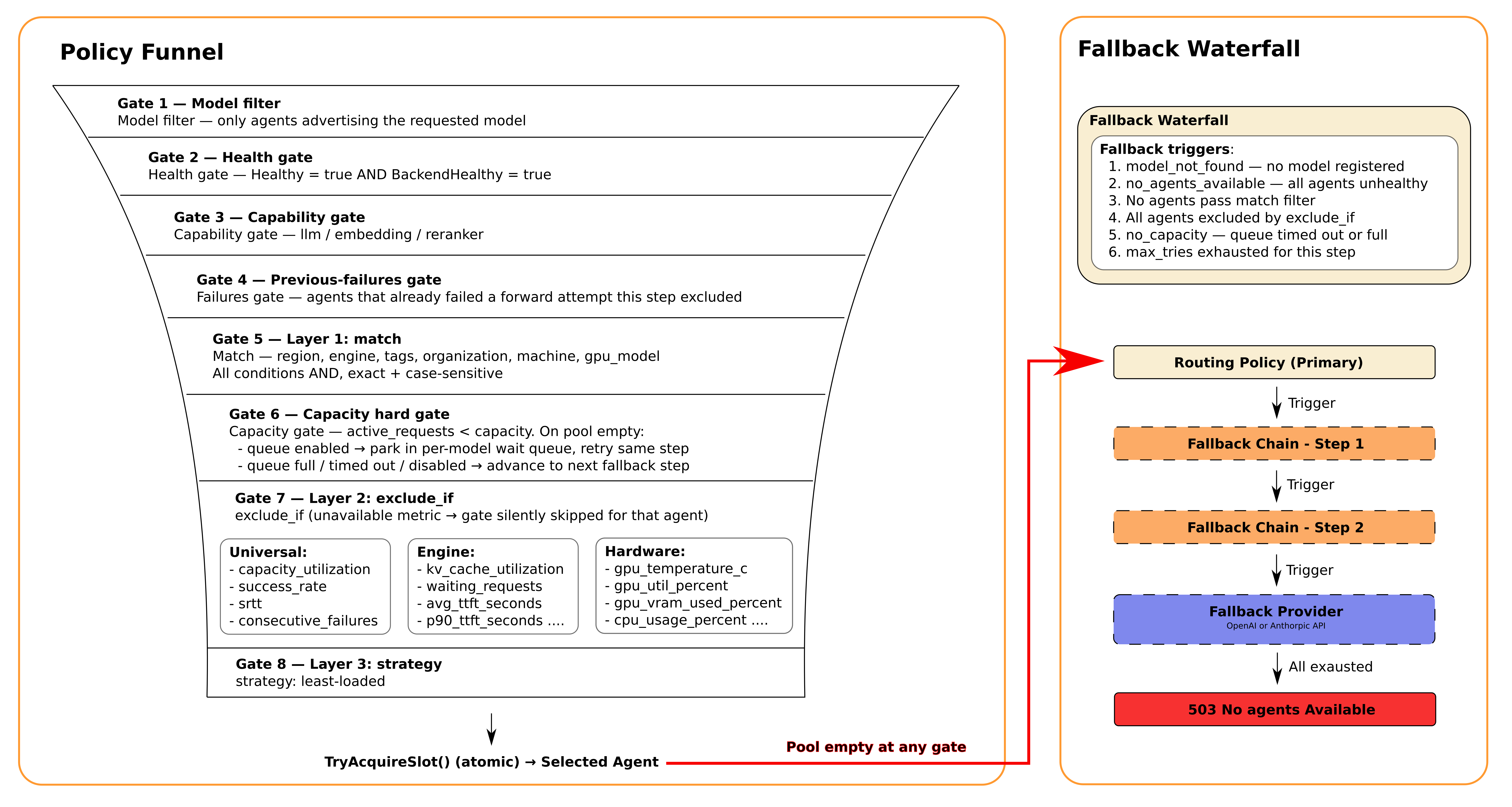
Every request is first limited to agents that serve the requested model and capability. Hivenet Router then applies static matching, live metric gates, and a ranking strategy. If the primary step cannot serve the request, the router can move through an ordered fallback chain.
 ## Routing at a glance
A request moves through these stages:
1. Match the requested model.
2. Remove unhealthy agents.
3. Match the required capability.
4. Apply the policy’s static `match` filters.
5. Remove agents that already failed during this policy step.
6. Remove agents at their declared capacity.
7. Apply live `exclude_if` gates.
8. Rank the remaining agents.
9. Acquire a capacity slot and forward the request.
10. Wait in the per-model queue when all matching agents are full.
11. Move to the next fallback step when the current step is exhausted.
12. Use an optional external provider fallback after all local steps fail.
The three configurable policy layers are:
| Layer | Configuration | Purpose |
| --------------- | ------------- | -------------------------------------------- |
| Static matching | `match` | Select agents by metadata |
| Dynamic gates | `exclude_if` | Remove agents using live operational signals |
| Ranking | `strategy` | Choose among the remaining candidates |
Model, health, capability, previous failures, and capacity are hard constraints. They apply even when the policy does not mention them.
## Default routing behavior
When you do not configure a policy file, Hivenet Router uses:
```yaml theme={null}
routing_policy:
match: {}
strategy: least-loaded
```
The default policy:
* accepts agents from any region, engine, organization, or machine
* applies no optional metric gates
* ranks matching agents by current load
* uses the router’s global retry limit
The default retry limit is three forward attempts per policy step.
You can change it with:
```bash theme={null}
--max-tries-per-step 5
```
A policy step can override that value with its own `max_tries`.
## Static matching
The `match` block filters agents by metadata reported during registration.
All non-empty fields must match. The fields use **AND logic**.
```yaml theme={null}
routing_policy:
match:
region: EU-France
engine: vllm
tags:
- production
- high-memory
organization: ml-team
machine: gpu-worker-1
gpu_model: RTX4090
strategy: least-loaded
```
### Match fields
| Field | Agent metadata | Example |
| -------------- | ------------------------------- | -------------- |
| `region` | Operator-defined region | `EU-France` |
| `engine` | Backend integration | `vllm` |
| `tags` | Operator-defined labels | `production` |
| `organization` | Team, owner, or provider | `ml-team` |
| `machine` | Stable machine identifier | `gpu-worker-1` |
| `gpu_model` | GPU model reported by the agent | `RTX4090` |
All comparisons are exact and case-sensitive.
For example:
```yaml theme={null}
region: EU
```
does not match:
```text theme={null}
EU-France
```
### Tag matching
When a policy lists several tags, the agent must contain **every** listed tag.
This policy:
```yaml theme={null}
match:
tags:
- production
- high-memory
```
matches an agent registered with:
```text theme={null}
production,high-memory,a100
```
It does not match an agent that has only:
```text theme={null}
production
```
The agent may contain additional tags that are not listed in the policy.
### Match every agent
Use an empty match block when the step should accept any agent that passes the hard constraints:
```yaml theme={null}
match: {}
```
You can also omit fields that you do not want to restrict.
## Dynamic gates
The `exclude_if` block removes agents whose live metrics cross configured thresholds.
```yaml theme={null}
exclude_if:
kv_cache_utilization:
gt: 0.85
gpu_temperature_c:
gt: 82
success_rate:
lt: 0.95
srtt:
gt: 500
```
An agent is excluded when **any** configured gate is violated.
The available comparison operators are:
| Operator | Excludes the agent when |
| -------- | ----------------------------------------------- |
| `gt` | Value is greater than the threshold |
| `gte` | Value is greater than or equal to the threshold |
| `lt` | Value is less than the threshold |
| `lte` | Value is less than or equal to the threshold |
Each field must define exactly one operator:
```yaml theme={null}
success_rate:
lt: 0.95
```
This is invalid:
```yaml theme={null}
success_rate:
lt: 0.95
gt: 0.5
```
Hivenet Router validates gate names and operators when loading the policy. Unknown fields and rules with zero or several operators are rejected.
## Missing metrics
A gate is skipped when its metric is unavailable for an agent.
For example, this gate:
```yaml theme={null}
exclude_if:
kv_cache_utilization:
gt: 0.85
```
does not automatically exclude an Ollama agent that reports no KV-cache metric.
Missing metrics pass the gate.
When a metric is required for safety or compliance, use static metadata to restrict the policy to engines or agents that are known to provide it.
For example:
```yaml theme={null}
match:
engine: vllm
exclude_if:
kv_cache_utilization:
gt: 0.85
```
This prevents an agent without the expected vLLM metric set from entering the candidate pool.
## Unit conventions
Policy values use these units:
| Metric type | Policy unit |
| ---------------------------------- | ---------------------------- |
| `srtt` | Milliseconds |
| `gpu_temperature_c` | Degrees Celsius |
| Utilization and percentage fields | Fraction from `0.0` to `1.0` |
| Request, queue, and failure fields | Absolute count |
| TTFT and ITL | Seconds |
Prometheus may expose some hardware values on a `0` to `100` scale. Hivenet Router normalizes those values to `0.0` to `1.0` before evaluating routing policies.
For example, use:
```yaml theme={null}
gpu_util_percent:
gt: 0.95
```
to exclude an agent above 95% GPU utilization.
Do not use:
```yaml theme={null}
gpu_util_percent:
gt: 95
```
## Universal gates
These signals can apply to every agent when the underlying history is available.
| Field | Meaning | Example |
| ---------------------- | -------------------------------------------- | -------------- |
| `capacity_utilization` | Active requests divided by declared capacity | `{ gt: 0.8 }` |
| `success_rate` | Lifetime successful-request fraction | `{ lt: 0.95 }` |
| `srtt` | Smoothed round-trip time in milliseconds | `{ gt: 500 }` |
| `consecutive_failures` | Forward failures since the last success | `{ gte: 3 }` |
### Capacity utilization
```yaml theme={null}
exclude_if:
capacity_utilization:
gt: 0.8
```
This gate removes an agent once more than 80% of its declared capacity is in use.
The hard capacity gate still removes an agent when:
```text theme={null}
active requests >= declared capacity
```
even when no capacity-utilization rule is configured.
For streaming responses, Hivenet Router releases the agent capacity slot when response headers arrive, while backend generation can continue. The active-request count is therefore a routing-admission signal, not a complete count of ongoing streams.
### Success rate
```yaml theme={null}
exclude_if:
success_rate:
lt: 0.95
```
Success rate comes from Hivenet Router’s request history for the agent.
A new agent with no request history has no success-rate value yet, so the gate is skipped until data exists.
### Smoothed latency
```yaml theme={null}
exclude_if:
srtt:
gt: 500
```
`srtt` uses Hivenet Router’s RFC 6298 smoothed round-trip-time calculation.
The value is measured in milliseconds. A new agent may not have an SRTT value until it has served requests.
### Consecutive failures
```yaml theme={null}
exclude_if:
consecutive_failures:
gte: 3
```
The counter increases after application-level forwarding failures and resets after a successful request.
## Engine gates
These values are available when the backend integration reports the relevant engine metrics.
vLLM provides the fullest metric set. SGLang and metrics-enabled llama.cpp provide overlapping subsets. Other integrations may leave these values unavailable.
| Field | Meaning | Example |
| ---------------------- | ---------------------------------------- | -------------- |
| `kv_cache_utilization` | KV or token-cache fraction in use | `{ gt: 0.85 }` |
| `running_requests` | Requests currently being processed | `{ gt: 50 }` |
| `waiting_requests` | Requests waiting in the engine scheduler | `{ gt: 10 }` |
| `avg_ttft_seconds` | Average time to first token | `{ gt: 2 }` |
| `p90_ttft_seconds` | P90 time to first token | `{ gt: 5 }` |
| `avg_itl_seconds` | Average inter-token latency | `{ gt: 0.1 }` |
| `p90_itl_seconds` | P90 inter-token latency | `{ gt: 0.2 }` |
Not every backend provides every field.
For example:
* vLLM reports cache, running, waiting, TTFT, and ITL metrics.
* SGLang reports cache, running, waiting, and TTFT metrics.
* metrics-enabled llama.cpp reports cache, running, waiting, TTFT, and ITL metrics.
* Ollama and custom engines do not currently provide these engine-specific signals.
## Hardware gates
Hardware gates use the latest snapshot reported by the agent.
| Field | Meaning | Example |
| ----------------------- | ---------------------------------------- | -------------- |
| `gpu_temperature_c` | Highest reported GPU temperature | `{ gt: 82 }` |
| `gpu_util_percent` | Highest GPU compute-utilization fraction | `{ gt: 0.95 }` |
| `gpu_vram_used_percent` | Highest GPU VRAM-used fraction | `{ gt: 0.9 }` |
| `memory_used_percent` | System-memory-used fraction | `{ gt: 0.9 }` |
| `cpu_usage_percent` | CPU-utilization fraction | `{ gt: 0.9 }` |
When an agent reports several GPUs, Hivenet Router evaluates the highest temperature, utilization, and VRAM-use value across those GPUs.
For example:
```yaml theme={null}
exclude_if:
gpu_temperature_c:
gt: 82
gpu_vram_used_percent:
gt: 0.9
memory_used_percent:
gt: 0.9
```
A CPU-only agent has no GPU values, so GPU gates are skipped for that agent.
## Ranking strategy
After matching and gates, Hivenet Router ranks the surviving agents.
The only implemented strategy is:
```yaml theme={null}
strategy: least-loaded
```
`least-loaded` ranks agents by:
```text theme={null}
active requests / declared capacity
```
The agent with the lowest ratio is selected first.
For example:
| Agent | Active requests | Capacity | Load ratio |
| ----- | --------------: | -------: | ---------: |
| A | 4 | 20 | `0.20` |
| B | 8 | 20 | `0.40` |
| C | 5 | 10 | `0.50` |
Agent A ranks first.
Agents must register a positive capacity. Non-positive values are rejected before the agent joins the routing pool.
When two agents have the same ratio, Hivenet Router currently resolves the tie using the deterministic peer-ID order returned by the registry. This is stable for a given set of peer IDs, but it is not round-robin and should not be used as client affinity.
The following strategies are not implemented:
* `lowest-srtt`
* `round-robin`
* `prefix-aware`
* `lowest-kv-cache`
* `lowest-queue`
* `best-ttft`
* `best-itl`
A policy using one of these names is rejected at load time.
## Forward attempts
Each policy step has a forward-attempt budget.
```yaml theme={null}
routing_policy:
strategy: least-loaded
max_tries: 3
```
When `max_tries` is zero or omitted, the step uses the router’s global value:
```bash theme={null}
--max-tries-per-step 3
```
A try is consumed when Hivenet Router forwards to an agent and receives a retryable forwarding failure.
Examples include:
* backend unavailability
* backend overload or rate-limit responses
* retryable backend errors
* transport failures after connection recovery is exhausted
Request-level failures such as `request_invalid`, `invalid_parameter`, `context_length_exceeded`, and `token_limit_exceeded` stop the routing session immediately. They do not consume additional tries or advance through other local agents.
Selection failures do not consume the budget.
An agent that fails a forward attempt is excluded from further attempts within the same policy step.
When the budget is exhausted, Hivenet Router advances to the next fallback step.
## Connection-level recovery
Router-agent traffic uses a persistent connection initiated by the agent.
A network interruption can leave the router with stale connection state even though the agent process is still running. Hivenet Router treats a connection-level `agent_disconnected` failure differently from a backend response.
For the first connection-level failure involving one agent and request, the router:
1. discards its stale peer connection state
2. retries the request path without consuming the step’s `max_tries` budget
This budget-free recovery is limited to one attempt per agent for each request. If the connection is still unavailable, the failure returns to the normal retry and fallback process. The agent’s own reconnect loop is responsible for re-establishing its outbound connection to the router.
Application-level errors do not trigger connection recovery because the agent returned a response over a working transport.
Connection resets increment:
```text theme={null}
hivenet_router_agent_connection_resets_total
```
A sustained increase may indicate repeated network interruption or agent reconnects.
## Capacity wait queue
When healthy, policy-matching agents exist but all of them are at capacity, Hivenet Router can place the request in a per-model wait queue.
Defaults:
| Setting | Default |
| --------------- | ----------------------------- |
| Queue depth | 30 waiting requests per model |
| Wait deadline | Router request timeout |
| Request timeout | 60 seconds |
Configure the queue depth:
```bash theme={null}
--queue-depth 50
```
Disable it:
```bash theme={null}
--queue-depth 0
```
Change the request timeout:
```bash theme={null}
--request-timeout 2m
```
While waiting, the request resumes when an agent releases a capacity slot.
Hivenet Router then evaluates the candidates again. The request does not reserve a particular agent while it waits.
If the queue is full or the request deadline expires, Hivenet Router moves to the next fallback step.
The queue is keyed by model. Traffic for one model does not consume another model’s queue depth.
## Fallback chains
A fallback chain defines ordered local alternatives.
```yaml theme={null}
routing_policy:
match:
region: EU-France
engine: vllm
strategy: least-loaded
max_tries: 3
fallback_chain:
- name: any-eu-vllm
match:
engine: vllm
exclude_if:
success_rate:
lt: 0.9
strategy: least-loaded
max_tries: 2
- name: any-engine
match: {}
strategy: least-loaded
max_tries: 2
```
The primary `routing_policy` is always evaluated first.
Each item in `fallback_chain` is another complete policy step with its own:
* name
* static filters
* dynamic gates
* strategy
* retry budget
The step name appears in logs and policy metrics. When no name is provided, Hivenet Router generates one based on its position in the chain.
Hivenet Router advances to the next step when:
* no agent is registered for the requested model
* all registered agents are unhealthy
* no agent matches the required capability
* no agent passes the static filters
* every remaining agent violates a dynamic gate
* matching agents stay at capacity until the queue is full or times out
* application-level forward failures exhaust `max_tries`
Model and capability remain hard constraints throughout the chain. A fallback step cannot send a request to an agent serving another model or workload type.
## Provider fallback
A policy can define one final external provider after every local step has been exhausted.
```yaml theme={null}
fallback_provider:
engine: openai
model: gpt-4o-mini
```
Supported providers are:
* `openai`
* `anthropic`
Set the corresponding router credential:
```bash theme={null}
export HIVENET_ROUTER_OPENAI_API_KEY=""
```
or:
```bash theme={null}
export HIVENET_ROUTER_ANTHROPIC_API_KEY=""
```
`fallback_provider` is a top-level policy field. It is not an entry inside `fallback_chain`.
Provider fallback is intended for non-streaming Chat Completions requests. It is not used for embeddings or reranking, and it is not a transparent fallback for Anthropic token counting or every Messages field.
The configured provider model replaces the model from the original client request.
For OpenAI, Hivenet Router sends an OpenAI Chat Completions request.
For Anthropic, Hivenet Router translates the supported OpenAI-style chat request into the Anthropic Messages format and converts the response back into an OpenAI-compatible chat response.
Provider fallback is non-streaming and supports only the fields handled by the provider adapter. Treat it as a final continuity mechanism rather than a transparent equivalent of every local backend feature.
See [Provider fallback](/routing/provider-fallback) for the complete configuration and limitations.
## Exact evaluation order
For each policy step, Hivenet Router evaluates agents in this order:
1. **Model filter**
## Routing at a glance
A request moves through these stages:
1. Match the requested model.
2. Remove unhealthy agents.
3. Match the required capability.
4. Apply the policy’s static `match` filters.
5. Remove agents that already failed during this policy step.
6. Remove agents at their declared capacity.
7. Apply live `exclude_if` gates.
8. Rank the remaining agents.
9. Acquire a capacity slot and forward the request.
10. Wait in the per-model queue when all matching agents are full.
11. Move to the next fallback step when the current step is exhausted.
12. Use an optional external provider fallback after all local steps fail.
The three configurable policy layers are:
| Layer | Configuration | Purpose |
| --------------- | ------------- | -------------------------------------------- |
| Static matching | `match` | Select agents by metadata |
| Dynamic gates | `exclude_if` | Remove agents using live operational signals |
| Ranking | `strategy` | Choose among the remaining candidates |
Model, health, capability, previous failures, and capacity are hard constraints. They apply even when the policy does not mention them.
## Default routing behavior
When you do not configure a policy file, Hivenet Router uses:
```yaml theme={null}
routing_policy:
match: {}
strategy: least-loaded
```
The default policy:
* accepts agents from any region, engine, organization, or machine
* applies no optional metric gates
* ranks matching agents by current load
* uses the router’s global retry limit
The default retry limit is three forward attempts per policy step.
You can change it with:
```bash theme={null}
--max-tries-per-step 5
```
A policy step can override that value with its own `max_tries`.
## Static matching
The `match` block filters agents by metadata reported during registration.
All non-empty fields must match. The fields use **AND logic**.
```yaml theme={null}
routing_policy:
match:
region: EU-France
engine: vllm
tags:
- production
- high-memory
organization: ml-team
machine: gpu-worker-1
gpu_model: RTX4090
strategy: least-loaded
```
### Match fields
| Field | Agent metadata | Example |
| -------------- | ------------------------------- | -------------- |
| `region` | Operator-defined region | `EU-France` |
| `engine` | Backend integration | `vllm` |
| `tags` | Operator-defined labels | `production` |
| `organization` | Team, owner, or provider | `ml-team` |
| `machine` | Stable machine identifier | `gpu-worker-1` |
| `gpu_model` | GPU model reported by the agent | `RTX4090` |
All comparisons are exact and case-sensitive.
For example:
```yaml theme={null}
region: EU
```
does not match:
```text theme={null}
EU-France
```
### Tag matching
When a policy lists several tags, the agent must contain **every** listed tag.
This policy:
```yaml theme={null}
match:
tags:
- production
- high-memory
```
matches an agent registered with:
```text theme={null}
production,high-memory,a100
```
It does not match an agent that has only:
```text theme={null}
production
```
The agent may contain additional tags that are not listed in the policy.
### Match every agent
Use an empty match block when the step should accept any agent that passes the hard constraints:
```yaml theme={null}
match: {}
```
You can also omit fields that you do not want to restrict.
## Dynamic gates
The `exclude_if` block removes agents whose live metrics cross configured thresholds.
```yaml theme={null}
exclude_if:
kv_cache_utilization:
gt: 0.85
gpu_temperature_c:
gt: 82
success_rate:
lt: 0.95
srtt:
gt: 500
```
An agent is excluded when **any** configured gate is violated.
The available comparison operators are:
| Operator | Excludes the agent when |
| -------- | ----------------------------------------------- |
| `gt` | Value is greater than the threshold |
| `gte` | Value is greater than or equal to the threshold |
| `lt` | Value is less than the threshold |
| `lte` | Value is less than or equal to the threshold |
Each field must define exactly one operator:
```yaml theme={null}
success_rate:
lt: 0.95
```
This is invalid:
```yaml theme={null}
success_rate:
lt: 0.95
gt: 0.5
```
Hivenet Router validates gate names and operators when loading the policy. Unknown fields and rules with zero or several operators are rejected.
## Missing metrics
A gate is skipped when its metric is unavailable for an agent.
For example, this gate:
```yaml theme={null}
exclude_if:
kv_cache_utilization:
gt: 0.85
```
does not automatically exclude an Ollama agent that reports no KV-cache metric.
Missing metrics pass the gate.
When a metric is required for safety or compliance, use static metadata to restrict the policy to engines or agents that are known to provide it.
For example:
```yaml theme={null}
match:
engine: vllm
exclude_if:
kv_cache_utilization:
gt: 0.85
```
This prevents an agent without the expected vLLM metric set from entering the candidate pool.
## Unit conventions
Policy values use these units:
| Metric type | Policy unit |
| ---------------------------------- | ---------------------------- |
| `srtt` | Milliseconds |
| `gpu_temperature_c` | Degrees Celsius |
| Utilization and percentage fields | Fraction from `0.0` to `1.0` |
| Request, queue, and failure fields | Absolute count |
| TTFT and ITL | Seconds |
Prometheus may expose some hardware values on a `0` to `100` scale. Hivenet Router normalizes those values to `0.0` to `1.0` before evaluating routing policies.
For example, use:
```yaml theme={null}
gpu_util_percent:
gt: 0.95
```
to exclude an agent above 95% GPU utilization.
Do not use:
```yaml theme={null}
gpu_util_percent:
gt: 95
```
## Universal gates
These signals can apply to every agent when the underlying history is available.
| Field | Meaning | Example |
| ---------------------- | -------------------------------------------- | -------------- |
| `capacity_utilization` | Active requests divided by declared capacity | `{ gt: 0.8 }` |
| `success_rate` | Lifetime successful-request fraction | `{ lt: 0.95 }` |
| `srtt` | Smoothed round-trip time in milliseconds | `{ gt: 500 }` |
| `consecutive_failures` | Forward failures since the last success | `{ gte: 3 }` |
### Capacity utilization
```yaml theme={null}
exclude_if:
capacity_utilization:
gt: 0.8
```
This gate removes an agent once more than 80% of its declared capacity is in use.
The hard capacity gate still removes an agent when:
```text theme={null}
active requests >= declared capacity
```
even when no capacity-utilization rule is configured.
For streaming responses, Hivenet Router releases the agent capacity slot when response headers arrive, while backend generation can continue. The active-request count is therefore a routing-admission signal, not a complete count of ongoing streams.
### Success rate
```yaml theme={null}
exclude_if:
success_rate:
lt: 0.95
```
Success rate comes from Hivenet Router’s request history for the agent.
A new agent with no request history has no success-rate value yet, so the gate is skipped until data exists.
### Smoothed latency
```yaml theme={null}
exclude_if:
srtt:
gt: 500
```
`srtt` uses Hivenet Router’s RFC 6298 smoothed round-trip-time calculation.
The value is measured in milliseconds. A new agent may not have an SRTT value until it has served requests.
### Consecutive failures
```yaml theme={null}
exclude_if:
consecutive_failures:
gte: 3
```
The counter increases after application-level forwarding failures and resets after a successful request.
## Engine gates
These values are available when the backend integration reports the relevant engine metrics.
vLLM provides the fullest metric set. SGLang and metrics-enabled llama.cpp provide overlapping subsets. Other integrations may leave these values unavailable.
| Field | Meaning | Example |
| ---------------------- | ---------------------------------------- | -------------- |
| `kv_cache_utilization` | KV or token-cache fraction in use | `{ gt: 0.85 }` |
| `running_requests` | Requests currently being processed | `{ gt: 50 }` |
| `waiting_requests` | Requests waiting in the engine scheduler | `{ gt: 10 }` |
| `avg_ttft_seconds` | Average time to first token | `{ gt: 2 }` |
| `p90_ttft_seconds` | P90 time to first token | `{ gt: 5 }` |
| `avg_itl_seconds` | Average inter-token latency | `{ gt: 0.1 }` |
| `p90_itl_seconds` | P90 inter-token latency | `{ gt: 0.2 }` |
Not every backend provides every field.
For example:
* vLLM reports cache, running, waiting, TTFT, and ITL metrics.
* SGLang reports cache, running, waiting, and TTFT metrics.
* metrics-enabled llama.cpp reports cache, running, waiting, TTFT, and ITL metrics.
* Ollama and custom engines do not currently provide these engine-specific signals.
## Hardware gates
Hardware gates use the latest snapshot reported by the agent.
| Field | Meaning | Example |
| ----------------------- | ---------------------------------------- | -------------- |
| `gpu_temperature_c` | Highest reported GPU temperature | `{ gt: 82 }` |
| `gpu_util_percent` | Highest GPU compute-utilization fraction | `{ gt: 0.95 }` |
| `gpu_vram_used_percent` | Highest GPU VRAM-used fraction | `{ gt: 0.9 }` |
| `memory_used_percent` | System-memory-used fraction | `{ gt: 0.9 }` |
| `cpu_usage_percent` | CPU-utilization fraction | `{ gt: 0.9 }` |
When an agent reports several GPUs, Hivenet Router evaluates the highest temperature, utilization, and VRAM-use value across those GPUs.
For example:
```yaml theme={null}
exclude_if:
gpu_temperature_c:
gt: 82
gpu_vram_used_percent:
gt: 0.9
memory_used_percent:
gt: 0.9
```
A CPU-only agent has no GPU values, so GPU gates are skipped for that agent.
## Ranking strategy
After matching and gates, Hivenet Router ranks the surviving agents.
The only implemented strategy is:
```yaml theme={null}
strategy: least-loaded
```
`least-loaded` ranks agents by:
```text theme={null}
active requests / declared capacity
```
The agent with the lowest ratio is selected first.
For example:
| Agent | Active requests | Capacity | Load ratio |
| ----- | --------------: | -------: | ---------: |
| A | 4 | 20 | `0.20` |
| B | 8 | 20 | `0.40` |
| C | 5 | 10 | `0.50` |
Agent A ranks first.
Agents must register a positive capacity. Non-positive values are rejected before the agent joins the routing pool.
When two agents have the same ratio, Hivenet Router currently resolves the tie using the deterministic peer-ID order returned by the registry. This is stable for a given set of peer IDs, but it is not round-robin and should not be used as client affinity.
The following strategies are not implemented:
* `lowest-srtt`
* `round-robin`
* `prefix-aware`
* `lowest-kv-cache`
* `lowest-queue`
* `best-ttft`
* `best-itl`
A policy using one of these names is rejected at load time.
## Forward attempts
Each policy step has a forward-attempt budget.
```yaml theme={null}
routing_policy:
strategy: least-loaded
max_tries: 3
```
When `max_tries` is zero or omitted, the step uses the router’s global value:
```bash theme={null}
--max-tries-per-step 3
```
A try is consumed when Hivenet Router forwards to an agent and receives a retryable forwarding failure.
Examples include:
* backend unavailability
* backend overload or rate-limit responses
* retryable backend errors
* transport failures after connection recovery is exhausted
Request-level failures such as `request_invalid`, `invalid_parameter`, `context_length_exceeded`, and `token_limit_exceeded` stop the routing session immediately. They do not consume additional tries or advance through other local agents.
Selection failures do not consume the budget.
An agent that fails a forward attempt is excluded from further attempts within the same policy step.
When the budget is exhausted, Hivenet Router advances to the next fallback step.
## Connection-level recovery
Router-agent traffic uses a persistent connection initiated by the agent.
A network interruption can leave the router with stale connection state even though the agent process is still running. Hivenet Router treats a connection-level `agent_disconnected` failure differently from a backend response.
For the first connection-level failure involving one agent and request, the router:
1. discards its stale peer connection state
2. retries the request path without consuming the step’s `max_tries` budget
This budget-free recovery is limited to one attempt per agent for each request. If the connection is still unavailable, the failure returns to the normal retry and fallback process. The agent’s own reconnect loop is responsible for re-establishing its outbound connection to the router.
Application-level errors do not trigger connection recovery because the agent returned a response over a working transport.
Connection resets increment:
```text theme={null}
hivenet_router_agent_connection_resets_total
```
A sustained increase may indicate repeated network interruption or agent reconnects.
## Capacity wait queue
When healthy, policy-matching agents exist but all of them are at capacity, Hivenet Router can place the request in a per-model wait queue.
Defaults:
| Setting | Default |
| --------------- | ----------------------------- |
| Queue depth | 30 waiting requests per model |
| Wait deadline | Router request timeout |
| Request timeout | 60 seconds |
Configure the queue depth:
```bash theme={null}
--queue-depth 50
```
Disable it:
```bash theme={null}
--queue-depth 0
```
Change the request timeout:
```bash theme={null}
--request-timeout 2m
```
While waiting, the request resumes when an agent releases a capacity slot.
Hivenet Router then evaluates the candidates again. The request does not reserve a particular agent while it waits.
If the queue is full or the request deadline expires, Hivenet Router moves to the next fallback step.
The queue is keyed by model. Traffic for one model does not consume another model’s queue depth.
## Fallback chains
A fallback chain defines ordered local alternatives.
```yaml theme={null}
routing_policy:
match:
region: EU-France
engine: vllm
strategy: least-loaded
max_tries: 3
fallback_chain:
- name: any-eu-vllm
match:
engine: vllm
exclude_if:
success_rate:
lt: 0.9
strategy: least-loaded
max_tries: 2
- name: any-engine
match: {}
strategy: least-loaded
max_tries: 2
```
The primary `routing_policy` is always evaluated first.
Each item in `fallback_chain` is another complete policy step with its own:
* name
* static filters
* dynamic gates
* strategy
* retry budget
The step name appears in logs and policy metrics. When no name is provided, Hivenet Router generates one based on its position in the chain.
Hivenet Router advances to the next step when:
* no agent is registered for the requested model
* all registered agents are unhealthy
* no agent matches the required capability
* no agent passes the static filters
* every remaining agent violates a dynamic gate
* matching agents stay at capacity until the queue is full or times out
* application-level forward failures exhaust `max_tries`
Model and capability remain hard constraints throughout the chain. A fallback step cannot send a request to an agent serving another model or workload type.
## Provider fallback
A policy can define one final external provider after every local step has been exhausted.
```yaml theme={null}
fallback_provider:
engine: openai
model: gpt-4o-mini
```
Supported providers are:
* `openai`
* `anthropic`
Set the corresponding router credential:
```bash theme={null}
export HIVENET_ROUTER_OPENAI_API_KEY=""
```
or:
```bash theme={null}
export HIVENET_ROUTER_ANTHROPIC_API_KEY=""
```
`fallback_provider` is a top-level policy field. It is not an entry inside `fallback_chain`.
Provider fallback is intended for non-streaming Chat Completions requests. It is not used for embeddings or reranking, and it is not a transparent fallback for Anthropic token counting or every Messages field.
The configured provider model replaces the model from the original client request.
For OpenAI, Hivenet Router sends an OpenAI Chat Completions request.
For Anthropic, Hivenet Router translates the supported OpenAI-style chat request into the Anthropic Messages format and converts the response back into an OpenAI-compatible chat response.
Provider fallback is non-streaming and supports only the fields handled by the provider adapter. Treat it as a final continuity mechanism rather than a transparent equivalent of every local backend feature.
See [Provider fallback](/routing/provider-fallback) for the complete configuration and limitations.
## Exact evaluation order
For each policy step, Hivenet Router evaluates agents in this order:
1. **Model filter**
Load agents registered for the requested model.
2. **Health gate**
Remove agents marked unhealthy or reporting an unhealthy backend.
3. **Capability gate**
Remove agents that do not serve the required `llm`, `embedding`, or `reranker` capability.
4. **Static match**
Apply `region`, `engine`, `tags`, `organization`, `machine`, and `gpu_model`.
5. **Previous failures**
Remove agents that already produced a forward failure in the current step.
6. **Capacity gate**
Remove agents whose active requests are greater than or equal to their declared capacity.
7. **Dynamic gates**
Apply the configured `exclude_if` thresholds.
8. **Strategy ranking**
Rank the remaining candidates with `least-loaded`.
9. **Atomic slot acquisition**
Attempt to reserve one capacity slot on the selected agent.
10. **Retry selection after a race**
If another request acquired the final slot first, select again without consuming a forward try.
11. **Wait queue**
If all eligible agents are full and queueing is enabled, wait for capacity and evaluate again.
12. **Fallback progression**
Move to the next step when there are no candidates or the forward-attempt budget is exhausted.
13. **Provider fallback**
For supported language-model requests, call the configured external provider after every local step is exhausted.
## Production example
```yaml theme={null}
# Primary: production vLLM agents in France
routing_policy:
match:
region: EU-France
engine: vllm
tags:
- production
exclude_if:
kv_cache_utilization:
gt: 0.85
gpu_temperature_c:
gt: 82
success_rate:
lt: 0.95
srtt:
gt: 500
strategy: least-loaded
max_tries: 3
# Fallback: any vLLM region with relaxed health thresholds
fallback_chain:
- name: any-vllm-region
match:
engine: vllm
exclude_if:
success_rate:
lt: 0.9
strategy: least-loaded
max_tries: 2
# Last resort for language-model chat requests
fallback_provider:
engine: openai
model: gpt-4o-mini
```
This policy:
1. prefers production vLLM agents in `EU-France`
2. excludes agents with high cache pressure, temperature, latency, or failure rates
3. falls back to vLLM agents in any region
4. uses OpenAI only after local routing is exhausted
## Observe routing decisions
Policy and routing metrics are available through the router’s Prometheus endpoint.
Inspect policy-related metrics:
```bash theme={null}
curl http://localhost:2112/metrics \
| grep hivenet_router_policy
```
Inspect routed requests:
```bash theme={null}
curl http://localhost:2112/metrics \
| grep hivenet_router_routing_requests_routed_total
```
Inspect stale-connection resets:
```bash theme={null}
curl http://localhost:2112/metrics \
| grep hivenet_router_agent_connection_resets_total
```
When a complete policy chain is exhausted, the router logs which gate drained each step’s candidate pool.
Enable policy debug logging for more detail:
```bash theme={null}
export GOLOG_LOG_LEVEL="policy=debug,router=debug"
```
## Troubleshooting
### The policy does not load
Check the router logs for validation errors.
Common causes include:
* missing `strategy`
* an unknown strategy
* a misspelled `exclude_if` field
* no comparison operator
* several operators on one gate
* an incomplete provider fallback
* invalid YAML indentation
Only `least-loaded` is currently accepted as a strategy.
### An agent does not match
All match values are exact and case-sensitive.
Compare the policy with live metadata:
```bash theme={null}
curl \
-H "Authorization: Bearer " \
http://localhost:8080/admin/routing-table \
| jq '.agents[] | {
model: .metadata.model,
engine: .metadata.engine,
region: .metadata.region,
organization: .metadata.organization,
machine: .metadata.machine,
tags: .metadata.tags,
gpu_model: .metadata.gpu_model
}'
```
Check that every tag in the policy appears on the agent.
### A metric gate does not exclude an agent
The metric may be unavailable.
Inspect the agent through the routing table and confirm that the relevant engine or hardware field is present.
Missing metrics skip the gate.
### Requests wait instead of falling back
Matching agents may exist but be at capacity.
Hivenet Router waits in the per-model queue before advancing to fallback. Reduce or disable the queue when immediate fallback is more appropriate:
```bash theme={null}
--queue-depth 0
```
### An external provider is never called
Check that:
* every local policy step was exhausted
* the request is a language-model chat request
* `fallback_provider` is at the policy’s top level
* the engine is `openai` or `anthropic`
* the corresponding environment variable is configured
* the provider model is not empty
## Next steps
Review the complete policy schema, fields, operators, and validation rules.
Configure ordered local alternatives and retry budgets.
Add OpenAI or Anthropic as a final fallback for chat requests.