> ## Documentation Index
> Fetch the complete documentation index at: https://routerdocs.hivenet.com/llms.txt
> Use this file to discover all available pages before exploring further.
# Authentication overview
> Understand how Hivenet Router authenticates agents, API clients, and administrators across separate trust boundaries.
Hivenet Router authenticates three kinds of access separately:
* agents joining the inference network
* clients calling `/v1/*` endpoints
* operators calling `/admin/*` endpoints
Agent authentication is always required. Client authentication may be disabled for local development. Administrator authentication is secure by default: the router refuses to start with unauthenticated `/admin/*` endpoints unless `HIVENET_ROUTER_ALLOW_INSECURE_ADMIN=true` is set explicitly.
 ## Authentication boundaries
| Access | Authentication | Required by default |
| --------------------- | ------------------------------------------------------------------- | ------------------------------------------------------------- |
| Agent → Router | JWT over pinned TLS, followed by a session token | Yes |
| Client → `/v1/*` | None, static API keys, or dynamic API keys | No |
| Operator → `/admin/*` | Static admin API keys, or an explicit insecure development override | Yes, unless `HIVENET_ROUTER_ALLOW_INSECURE_ADMIN=true` is set |
When no client authentication configuration is provided, `/v1/*` is accessible to any client that can reach the router.
`/admin/*` does not become public automatically. The router refuses insecure administrator mode unless `HIVENET_ROUTER_ALLOW_INSECURE_ADMIN=true` is set explicitly. Use that override only in an isolated development environment.
Agent authentication is separate from the two HTTP authentication surfaces. Setting the client API to `none` does not disable router-agent authentication.
## Agent authentication
Every agent must authenticate before it can register with the router.
The router and every agent share one high-entropy secret. Hivenet Router uses that secret for two related purposes:
* signing and validating agent JWTs
* deriving the gRPC TLS identity used during authentication
The secret must contain at least 32 bytes.
Generate one:
```bash theme={null}
openssl rand -hex 32 > jwt.secret
chmod 600 jwt.secret
```
Use the same file on the router:
```bash theme={null}
./bin/hivenet-router \
--jwt-secret-file /etc/hivenet-router/jwt.secret \
...
```
and every agent:
```bash theme={null}
./bin/hivenet-agent \
--jwt-secret-file /etc/hivenet-router/jwt.secret \
...
```
You can also provide the value through the case-sensitive environment variable:
```bash theme={null}
export HIVENET_ROUTER_JWT_SECRET=""
```
Anyone who obtains this secret can authenticate an agent and derive the gRPC server identity.
Distribute it through your normal secrets-management system and restrict access on every host.
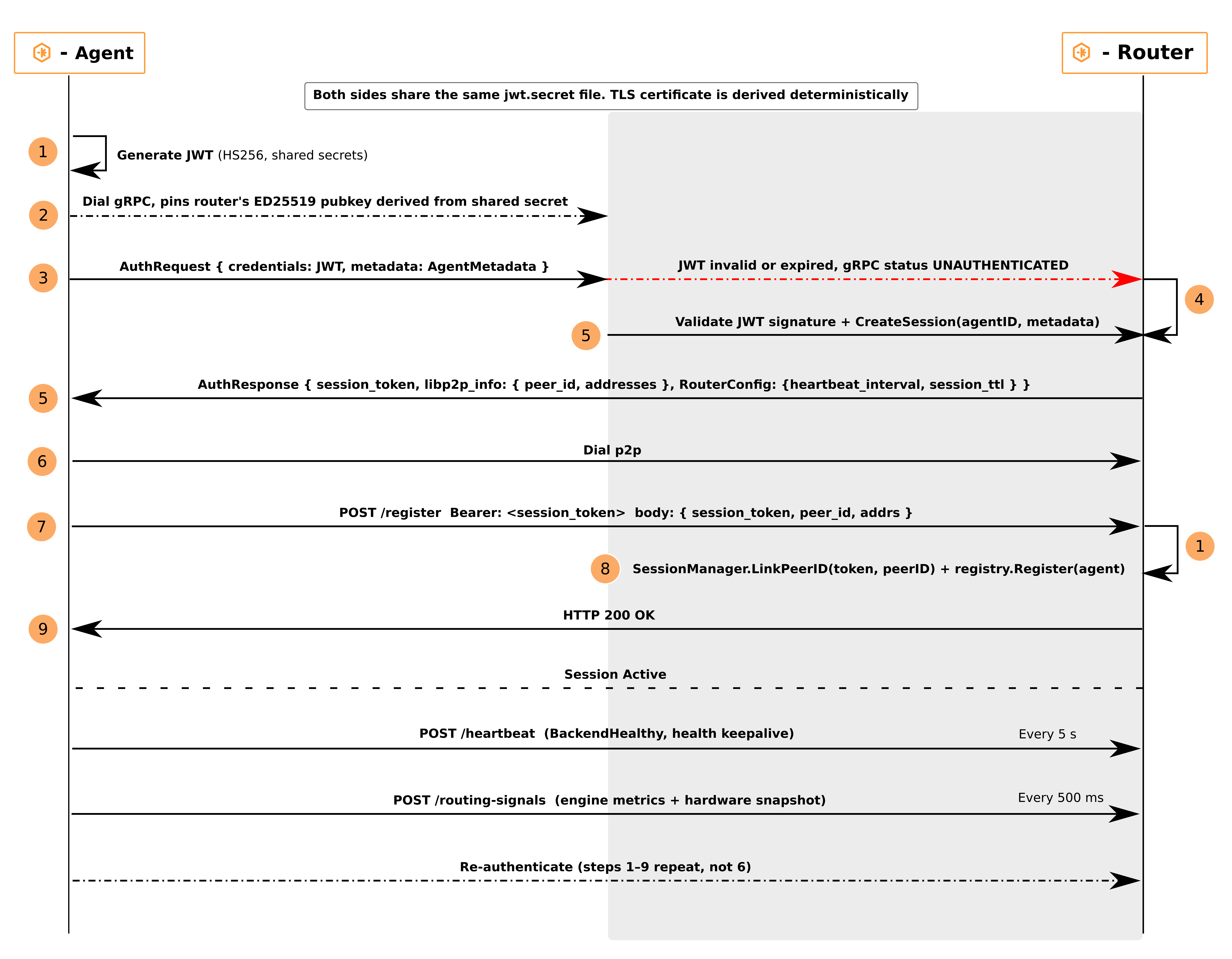
## Agent authentication flow
An agent joins the network in two stages.
### 1. Authenticate over gRPC
The agent:
1. creates a JWT signed with HMAC-SHA256
2. includes its libp2p peer ID as the JWT subject
3. connects to the router’s gRPC authentication endpoint
4. verifies the router’s pinned TLS public key
5. sends the JWT and its agent metadata
The router:
1. verifies the JWT signature
2. validates its issuer, issue time, expiry, and subject
3. validates required agent metadata
4. creates a random session token
5. returns the session token, router libp2p addresses, and runtime configuration
The gRPC endpoint uses TLS 1.3.
Hivenet Router deterministically derives an Ed25519 certificate and public key from the shared JWT secret using HKDF-SHA256. The agent pins that public key, so the deployment does not need a separate certificate authority or pre-distributed gRPC certificate files.
A router and agent using different secrets fail the TLS identity check before registration.
### 2. Register over libp2p
After gRPC authentication, the agent connects to the router’s libp2p endpoint and presents the session token.
The router links:
* the authenticated agent identity
* the agent’s libp2p peer ID
* its registered model and metadata
* the short-lived session
Router-agent traffic then uses libp2p with Noise encryption.
## Agent metadata validation
The router rejects authentication when required metadata is missing or invalid.
Required fields include:
* model
* positive capacity
* agent version
* engine
* region
* organization
Other metadata can include:
* capability
* machine identifier
* tags
* GPU model
* display name and model description
If metadata validation fails, the agent receives an unsuccessful gRPC authentication response and does not register.
## Agent sessions
The session token is separate from the initial JWT.
| Setting | Default |
| -------------------------- | ----------------------- |
| Session lifetime | 1 hour |
| Reauthentication margin | 5 minutes before expiry |
| Retry after failed renewal | 30 seconds |
Configure the router session lifetime:
```bash theme={null}
--session-ttl 2h
```
or:
```bash theme={null}
export HIVENET_ROUTER_SESSION_TTL=2h
```
The value must be greater than five minutes.
The agent reads the session lifetime returned by the router and reauthenticates five minutes before expiry. After receiving a new session token, it registers that token against the same libp2p peer ID without interrupting normal heartbeats and routing signals.
If renewal fails, the agent retries after 30 seconds.
## Client API authentication
Client authentication protects the `/v1/*` endpoints, including:
* chat completions and messages
* embeddings
* reranking
* model discovery
Hivenet Router supports three client-authentication modes.
| Mode | Key source | Persistence | Best suited to |
| --------- | ------------------ | -------------- | ------------------------- |
| `none` | No keys | Not applicable | Local development |
| `api-key` | `auth.yaml` | File on disk | Static deployments |
| `dynamic` | Administration API | Memory only | External control services |
### No authentication
When no `auth.yaml` is configured and `HIVENET_ROUTER_AUTH_MODE` is unset, the client API uses:
```text theme={null}
none
```
Requests do not require an `Authorization` header.
The authenticated tenant is recorded internally as:
```text theme={null}
default
```
Use this only on a protected local or private network.
### Static API keys
Static mode loads hashed API keys from `auth.yaml`.
```yaml theme={null}
api:
mode: api-key
keys:
- key_hash: ""
key_preview: "sk-...KJ4"
metadata:
name: "Acme production key"
owner: "acme-corp"
description: ""
created_at: "27-07-2026"
models:
- "meta-llama/Llama-3.1-8B-Instruct"
quota:
requests_per_minute: 100
tokens_per_day: 500000
admin:
mode: api-key
```
Generate a key and the matching YAML entry:
```bash theme={null}
./bin/hivenet-router \
keygen \
--tenant acme-corp
```
The command prints:
* the raw client key, shown once
* its SHA-256 hash
* a masked preview
* a ready-to-paste `auth.yaml` entry
The generated key begins with:
```text theme={null}
sk-hivenet-
```
Store the raw value securely. Hivenet Router stores and compares only its SHA-256 hash.
Start the router with the file:
```bash theme={null}
./bin/hivenet-router \
--auth-config-file /etc/hivenet-router/auth.yaml \
...
```
Send the raw key as a bearer token:
```bash theme={null}
curl \
-H "Authorization: Bearer sk-hivenet-..." \
http://localhost:8080/v1/models
```
Static API keys can define:
* tenant identity
* human-readable metadata
* expiration
* model restrictions
* request-rate limits
* daily token limits
* per-model quotas
Send `SIGHUP` after changing `auth.yaml`:
```bash theme={null}
sudo kill -HUP "$(pgrep hivenet-router)"
```
Hivenet Router validates the updated file before replacing the active static-key provider.
A successful authentication reload rebuilds in-memory quota state. Request-rate buckets reset. Daily token usage also resets with the `memory` quota backend, while the `badger` backend preserves and restores daily token state.
### Dynamic API keys
Dynamic mode uses an in-memory key registry managed through protected administration endpoints.
Enable it when no `auth.yaml` is provided:
```bash theme={null}
export HIVENET_ROUTER_AUTH_MODE=dynamic
export HIVENET_ROUTER_ADMIN_API_KEYS=""
```
The registry starts empty. An external control service must add or replace client keys through:
```text theme={null}
PUT /admin/api-keys/{id}
DELETE /admin/api-keys/{id}
POST /admin/api-keys/replace
```
Dynamic entries contain SHA-256 key hashes rather than plaintext client keys.
The registry is not persisted. It must be repopulated after every router restart.
Administration authentication is mandatory in dynamic mode.
Hivenet Router refuses to start without `HIVENET_ROUTER_ADMIN_API_KEYS`, because the administration endpoints control the client-key registry itself.
See [Admin endpoints](/use-the-api/admin-endpoints) for the dynamic registry API.
## Client request format
Send the raw client key in the standard bearer header:
```text theme={null}
Authorization: Bearer
```
For example:
```bash theme={null}
curl -X POST \
http://localhost:8080/v1/chat/completions \
-H "Authorization: Bearer sk-hivenet-..." \
-H "Content-Type: application/json" \
-d '{
"model": "meta-llama/Llama-3.1-8B-Instruct",
"messages": [
{
"role": "user",
"content": "Hello"
}
]
}'
```
Hivenet Router also accepts the raw token without the `Bearer` prefix, but the standard bearer format is recommended for clients and proxies.
## What successful authentication provides
After a client key is authenticated, Hivenet Router adds its resolved access information to the request context.
This includes:
* tenant or owner ID
* dynamic key ID, when applicable
* masked key preview
* allowed models
* quota configuration
Downstream middleware and handlers use these values for:
* model authorization
* request-rate enforcement
* token-budget enforcement
* tenant metrics
* audit records
Authentication confirms the key. Separate authorization and quota checks decide whether the request may use the selected model and capacity.
## Model access control
A client key can be limited to specific models.
For static keys:
```yaml theme={null}
models:
- "meta-llama/Llama-3.1-8B-Instruct"
- "BAAI/bge-m3"
```
An empty model list grants access to all registered models unless a per-model quota configuration defines a narrower set.
A request for a disallowed model returns HTTP `403`:
```json theme={null}
{
"error": {
"code": "model_forbidden",
"message": "your API key does not have access to model: restricted-model",
"source": "router"
}
}
```
The model catalog is also filtered to the models visible to the calling key.
When `quota.per_model` is configured, its model names become the effective allowlist. A model missing from that map is hidden from discovery and rejected for inference with HTTP `429 rate_limit_exceeded`, rather than `403 model_forbidden`.
See [Model restrictions](/security/model-restrictions) for the complete behavior.
## Administration authentication
Administration authentication protects `/admin/*`.
Configure it separately in `auth.yaml`:
```yaml theme={null}
api:
mode: api-key
keys:
# Client keys
admin:
mode: api-key
```
Raw admin keys come from:
```bash theme={null}
export HIVENET_ROUTER_ADMIN_API_KEYS="first-admin-key,second-admin-key"
```
The values are comma-separated.
Hivenet Router hashes them at startup for request comparison. They are not added to `auth.yaml`.
Changing a systemd environment file, Docker `.env` file, Kubernetes Secret, or shell configuration does not change the environment of an already running router. Restart or recreate the router after changing `HIVENET_ROUTER_ADMIN_API_KEYS`.
Use an admin key:
```bash theme={null}
curl \
-H "Authorization: Bearer first-admin-key" \
http://localhost:8080/admin/health
```
Use different credentials for the client and administration surfaces.
Client API keys do not automatically grant administration access, and admin keys do not automatically act as client API keys.
When `admin.mode` is `none`, the router refuses to start unless you also set:
```bash theme={null}
export HIVENET_ROUTER_ALLOW_INSECURE_ADMIN=true
```
That override makes the administration API accessible to any network client that can reach it. Use it only for isolated development and testing.
## Configuration precedence
When an auth configuration file is provided:
```bash theme={null}
--auth-config-file /etc/hivenet-router/auth.yaml
```
the file controls the API and admin sections.
The client API can otherwise use:
```bash theme={null}
HIVENET_ROUTER_AUTH_MODE
```
when no auth file is configured.
In practical terms:
| Configuration | Result |
| ---------------------------------------------- | ----------------------------------------------------------------------------------------------------------- |
| No file and no env mode | Client auth defaults to `none`; router startup fails for insecure admin unless the explicit override is set |
| `auth.yaml` present | File controls both sections |
| No file and `HIVENET_ROUTER_AUTH_MODE=dynamic` | Dynamic client auth; admin auth forced to `api-key` |
| File plus `HIVENET_ROUTER_AUTH_MODE` | The file’s `api.mode` takes precedence |
Invalid modes, empty required key lists, malformed hashes, duplicate hashes, invalid expiry dates, or invalid quotas prevent the router from starting or reloading the configuration.
## Authentication failures
Missing, malformed, expired, and unknown client or admin credentials receive the same response.
```text theme={null}
HTTP/1.1 401 Unauthorized
WWW-Authenticate: Bearer realm="hivenet-router"
```
```json theme={null}
{
"error": {
"code": "unauthorized",
"message": "unauthorized",
"source": "router"
}
}
```
Hivenet Router deliberately does not reveal whether:
* the header was missing
* the key was unknown
* the key had expired
* the key was disabled
This reduces information leakage to unauthenticated callers.
Agent-authentication failures are reported to the agent through the gRPC authentication response and router logs rather than through the public HTTP error envelope.
## Transport security
Hivenet Router protects different network paths differently.
| Path | Transport protection |
| ---------------------------------- | ----------------------------------------------------- |
| Agent → Router gRPC authentication | TLS 1.3 with a pinned key derived from the JWT secret |
| Router ↔ Agent libp2p traffic | Noise encryption |
| Client → Router HTTP API | No built-in TLS termination |
For production client traffic, place Hivenet Router behind a reverse proxy, ingress, or load balancer that provides HTTPS.
For example:
```text theme={null}
Client
↓ HTTPS
Reverse proxy
↓ private HTTP
Hivenet Router router
```
Authentication does not replace network security. Restrict:
* gRPC and router libp2p ports to agent hosts
* administration endpoints to operators or management networks
* Prometheus endpoints to monitoring systems
## Secret responsibilities
| Secret | Shared with | Used for |
| ---------------- | ------------------------------ | ------------------------------------------------ |
| Agent JWT secret | Router and every agent | Agent JWT validation and gRPC TLS identity |
| Client API key | One or more applications | `/v1/*` authentication, model access, and quotas |
| Admin API key | Operators and control services | `/admin/*` authentication |
| Provider API key | Router only | OpenAI or Anthropic fallback |
Do not reuse one value for several roles.
Compromise has different consequences:
* the agent secret allows unauthorized agents to join
* a client key allows requests within that key’s permissions and quotas
* an admin key allows operational access and possibly key-registry changes
* a provider key allows billable external-provider use
## Recommended production baseline
1. Generate a strong shared agent secret.
2. Store it through a secrets manager on the router and agents.
3. Enable static or dynamic authentication for `/v1/*`.
4. Enable administration API-key authentication.
5. Use distinct client, admin, agent, and provider credentials.
6. Restrict each port at the network layer.
7. terminate client-facing HTTPS before the router.
8. Apply least-privilege model access and quotas.
9. Enable audit logging and authentication metrics.
10. Define and test a rotation process.
## Troubleshooting
### An agent reports a TLS key mismatch
The router and agent are using different JWT secrets.
Compare their secret files without printing their contents:
```bash theme={null}
sha256sum /etc/hivenet-router/jwt.secret
```
The hashes must match.
Restart the affected process after correcting the secret.
### The router rejects the agent metadata
Check the agent logs for the field named in the rejection.
Required values include:
* model
* positive capacity
* version
* engine
* region
* organization
### A client receives `401 unauthorized`
Check that:
* the correct key is being sent
* the header uses the expected value
* the router loaded the intended auth configuration
* the static key has not expired
* a dynamic key is enabled and present after the latest router restart
* the request is reaching the intended router environment
Do not expect the response to distinguish these cases. Check operator logs and configuration.
### A valid client key receives `403 model_forbidden`
Authentication succeeded, but the key may not use the requested model.
Review:
* `models` for static keys
* `allowed_models` for dynamic keys
* `quota.per_model`
* exact model spelling and capitalization
### Administration requests receive `401`
Client and administration credentials are separate.
Confirm that:
```yaml theme={null}
admin:
mode: api-key
```
and that the submitted value appears in:
```text theme={null}
HIVENET_ROUTER_ADMIN_API_KEYS
```
Restart the router after changing the environment variable.
### Static changes do not take effect
Send `SIGHUP`:
```bash theme={null}
sudo kill -HUP "$(pgrep hivenet-router)"
```
Then inspect the router logs for parsing or validation errors.
Dynamic registry entries are not reloaded from `auth.yaml`.
### Dynamic keys disappear
The dynamic registry is stored in memory.
Repopulate it through the administration API after every router restart.
## Next steps
Generate, configure, manage, and revoke static and dynamic client keys.
Review the complete static authentication and quota schema.
Rotate agent, client, administrator, and provider credentials safely.
## Authentication boundaries
| Access | Authentication | Required by default |
| --------------------- | ------------------------------------------------------------------- | ------------------------------------------------------------- |
| Agent → Router | JWT over pinned TLS, followed by a session token | Yes |
| Client → `/v1/*` | None, static API keys, or dynamic API keys | No |
| Operator → `/admin/*` | Static admin API keys, or an explicit insecure development override | Yes, unless `HIVENET_ROUTER_ALLOW_INSECURE_ADMIN=true` is set |
When no client authentication configuration is provided, `/v1/*` is accessible to any client that can reach the router.
`/admin/*` does not become public automatically. The router refuses insecure administrator mode unless `HIVENET_ROUTER_ALLOW_INSECURE_ADMIN=true` is set explicitly. Use that override only in an isolated development environment.
Agent authentication is separate from the two HTTP authentication surfaces. Setting the client API to `none` does not disable router-agent authentication.
## Agent authentication
Every agent must authenticate before it can register with the router.
The router and every agent share one high-entropy secret. Hivenet Router uses that secret for two related purposes:
* signing and validating agent JWTs
* deriving the gRPC TLS identity used during authentication
The secret must contain at least 32 bytes.
Generate one:
```bash theme={null}
openssl rand -hex 32 > jwt.secret
chmod 600 jwt.secret
```
Use the same file on the router:
```bash theme={null}
./bin/hivenet-router \
--jwt-secret-file /etc/hivenet-router/jwt.secret \
...
```
and every agent:
```bash theme={null}
./bin/hivenet-agent \
--jwt-secret-file /etc/hivenet-router/jwt.secret \
...
```
You can also provide the value through the case-sensitive environment variable:
```bash theme={null}
export HIVENET_ROUTER_JWT_SECRET=""
```
Anyone who obtains this secret can authenticate an agent and derive the gRPC server identity.
Distribute it through your normal secrets-management system and restrict access on every host.
## Agent authentication flow
An agent joins the network in two stages.
### 1. Authenticate over gRPC
The agent:
1. creates a JWT signed with HMAC-SHA256
2. includes its libp2p peer ID as the JWT subject
3. connects to the router’s gRPC authentication endpoint
4. verifies the router’s pinned TLS public key
5. sends the JWT and its agent metadata
The router:
1. verifies the JWT signature
2. validates its issuer, issue time, expiry, and subject
3. validates required agent metadata
4. creates a random session token
5. returns the session token, router libp2p addresses, and runtime configuration
The gRPC endpoint uses TLS 1.3.
Hivenet Router deterministically derives an Ed25519 certificate and public key from the shared JWT secret using HKDF-SHA256. The agent pins that public key, so the deployment does not need a separate certificate authority or pre-distributed gRPC certificate files.
A router and agent using different secrets fail the TLS identity check before registration.
### 2. Register over libp2p
After gRPC authentication, the agent connects to the router’s libp2p endpoint and presents the session token.
The router links:
* the authenticated agent identity
* the agent’s libp2p peer ID
* its registered model and metadata
* the short-lived session
Router-agent traffic then uses libp2p with Noise encryption.
## Agent metadata validation
The router rejects authentication when required metadata is missing or invalid.
Required fields include:
* model
* positive capacity
* agent version
* engine
* region
* organization
Other metadata can include:
* capability
* machine identifier
* tags
* GPU model
* display name and model description
If metadata validation fails, the agent receives an unsuccessful gRPC authentication response and does not register.
## Agent sessions
The session token is separate from the initial JWT.
| Setting | Default |
| -------------------------- | ----------------------- |
| Session lifetime | 1 hour |
| Reauthentication margin | 5 minutes before expiry |
| Retry after failed renewal | 30 seconds |
Configure the router session lifetime:
```bash theme={null}
--session-ttl 2h
```
or:
```bash theme={null}
export HIVENET_ROUTER_SESSION_TTL=2h
```
The value must be greater than five minutes.
The agent reads the session lifetime returned by the router and reauthenticates five minutes before expiry. After receiving a new session token, it registers that token against the same libp2p peer ID without interrupting normal heartbeats and routing signals.
If renewal fails, the agent retries after 30 seconds.
## Client API authentication
Client authentication protects the `/v1/*` endpoints, including:
* chat completions and messages
* embeddings
* reranking
* model discovery
Hivenet Router supports three client-authentication modes.
| Mode | Key source | Persistence | Best suited to |
| --------- | ------------------ | -------------- | ------------------------- |
| `none` | No keys | Not applicable | Local development |
| `api-key` | `auth.yaml` | File on disk | Static deployments |
| `dynamic` | Administration API | Memory only | External control services |
### No authentication
When no `auth.yaml` is configured and `HIVENET_ROUTER_AUTH_MODE` is unset, the client API uses:
```text theme={null}
none
```
Requests do not require an `Authorization` header.
The authenticated tenant is recorded internally as:
```text theme={null}
default
```
Use this only on a protected local or private network.
### Static API keys
Static mode loads hashed API keys from `auth.yaml`.
```yaml theme={null}
api:
mode: api-key
keys:
- key_hash: ""
key_preview: "sk-...KJ4"
metadata:
name: "Acme production key"
owner: "acme-corp"
description: ""
created_at: "27-07-2026"
models:
- "meta-llama/Llama-3.1-8B-Instruct"
quota:
requests_per_minute: 100
tokens_per_day: 500000
admin:
mode: api-key
```
Generate a key and the matching YAML entry:
```bash theme={null}
./bin/hivenet-router \
keygen \
--tenant acme-corp
```
The command prints:
* the raw client key, shown once
* its SHA-256 hash
* a masked preview
* a ready-to-paste `auth.yaml` entry
The generated key begins with:
```text theme={null}
sk-hivenet-
```
Store the raw value securely. Hivenet Router stores and compares only its SHA-256 hash.
Start the router with the file:
```bash theme={null}
./bin/hivenet-router \
--auth-config-file /etc/hivenet-router/auth.yaml \
...
```
Send the raw key as a bearer token:
```bash theme={null}
curl \
-H "Authorization: Bearer sk-hivenet-..." \
http://localhost:8080/v1/models
```
Static API keys can define:
* tenant identity
* human-readable metadata
* expiration
* model restrictions
* request-rate limits
* daily token limits
* per-model quotas
Send `SIGHUP` after changing `auth.yaml`:
```bash theme={null}
sudo kill -HUP "$(pgrep hivenet-router)"
```
Hivenet Router validates the updated file before replacing the active static-key provider.
A successful authentication reload rebuilds in-memory quota state. Request-rate buckets reset. Daily token usage also resets with the `memory` quota backend, while the `badger` backend preserves and restores daily token state.
### Dynamic API keys
Dynamic mode uses an in-memory key registry managed through protected administration endpoints.
Enable it when no `auth.yaml` is provided:
```bash theme={null}
export HIVENET_ROUTER_AUTH_MODE=dynamic
export HIVENET_ROUTER_ADMIN_API_KEYS=""
```
The registry starts empty. An external control service must add or replace client keys through:
```text theme={null}
PUT /admin/api-keys/{id}
DELETE /admin/api-keys/{id}
POST /admin/api-keys/replace
```
Dynamic entries contain SHA-256 key hashes rather than plaintext client keys.
The registry is not persisted. It must be repopulated after every router restart.
Administration authentication is mandatory in dynamic mode.
Hivenet Router refuses to start without `HIVENET_ROUTER_ADMIN_API_KEYS`, because the administration endpoints control the client-key registry itself.
See [Admin endpoints](/use-the-api/admin-endpoints) for the dynamic registry API.
## Client request format
Send the raw client key in the standard bearer header:
```text theme={null}
Authorization: Bearer
```
For example:
```bash theme={null}
curl -X POST \
http://localhost:8080/v1/chat/completions \
-H "Authorization: Bearer sk-hivenet-..." \
-H "Content-Type: application/json" \
-d '{
"model": "meta-llama/Llama-3.1-8B-Instruct",
"messages": [
{
"role": "user",
"content": "Hello"
}
]
}'
```
Hivenet Router also accepts the raw token without the `Bearer` prefix, but the standard bearer format is recommended for clients and proxies.
## What successful authentication provides
After a client key is authenticated, Hivenet Router adds its resolved access information to the request context.
This includes:
* tenant or owner ID
* dynamic key ID, when applicable
* masked key preview
* allowed models
* quota configuration
Downstream middleware and handlers use these values for:
* model authorization
* request-rate enforcement
* token-budget enforcement
* tenant metrics
* audit records
Authentication confirms the key. Separate authorization and quota checks decide whether the request may use the selected model and capacity.
## Model access control
A client key can be limited to specific models.
For static keys:
```yaml theme={null}
models:
- "meta-llama/Llama-3.1-8B-Instruct"
- "BAAI/bge-m3"
```
An empty model list grants access to all registered models unless a per-model quota configuration defines a narrower set.
A request for a disallowed model returns HTTP `403`:
```json theme={null}
{
"error": {
"code": "model_forbidden",
"message": "your API key does not have access to model: restricted-model",
"source": "router"
}
}
```
The model catalog is also filtered to the models visible to the calling key.
When `quota.per_model` is configured, its model names become the effective allowlist. A model missing from that map is hidden from discovery and rejected for inference with HTTP `429 rate_limit_exceeded`, rather than `403 model_forbidden`.
See [Model restrictions](/security/model-restrictions) for the complete behavior.
## Administration authentication
Administration authentication protects `/admin/*`.
Configure it separately in `auth.yaml`:
```yaml theme={null}
api:
mode: api-key
keys:
# Client keys
admin:
mode: api-key
```
Raw admin keys come from:
```bash theme={null}
export HIVENET_ROUTER_ADMIN_API_KEYS="first-admin-key,second-admin-key"
```
The values are comma-separated.
Hivenet Router hashes them at startup for request comparison. They are not added to `auth.yaml`.
Changing a systemd environment file, Docker `.env` file, Kubernetes Secret, or shell configuration does not change the environment of an already running router. Restart or recreate the router after changing `HIVENET_ROUTER_ADMIN_API_KEYS`.
Use an admin key:
```bash theme={null}
curl \
-H "Authorization: Bearer first-admin-key" \
http://localhost:8080/admin/health
```
Use different credentials for the client and administration surfaces.
Client API keys do not automatically grant administration access, and admin keys do not automatically act as client API keys.
When `admin.mode` is `none`, the router refuses to start unless you also set:
```bash theme={null}
export HIVENET_ROUTER_ALLOW_INSECURE_ADMIN=true
```
That override makes the administration API accessible to any network client that can reach it. Use it only for isolated development and testing.
## Configuration precedence
When an auth configuration file is provided:
```bash theme={null}
--auth-config-file /etc/hivenet-router/auth.yaml
```
the file controls the API and admin sections.
The client API can otherwise use:
```bash theme={null}
HIVENET_ROUTER_AUTH_MODE
```
when no auth file is configured.
In practical terms:
| Configuration | Result |
| ---------------------------------------------- | ----------------------------------------------------------------------------------------------------------- |
| No file and no env mode | Client auth defaults to `none`; router startup fails for insecure admin unless the explicit override is set |
| `auth.yaml` present | File controls both sections |
| No file and `HIVENET_ROUTER_AUTH_MODE=dynamic` | Dynamic client auth; admin auth forced to `api-key` |
| File plus `HIVENET_ROUTER_AUTH_MODE` | The file’s `api.mode` takes precedence |
Invalid modes, empty required key lists, malformed hashes, duplicate hashes, invalid expiry dates, or invalid quotas prevent the router from starting or reloading the configuration.
## Authentication failures
Missing, malformed, expired, and unknown client or admin credentials receive the same response.
```text theme={null}
HTTP/1.1 401 Unauthorized
WWW-Authenticate: Bearer realm="hivenet-router"
```
```json theme={null}
{
"error": {
"code": "unauthorized",
"message": "unauthorized",
"source": "router"
}
}
```
Hivenet Router deliberately does not reveal whether:
* the header was missing
* the key was unknown
* the key had expired
* the key was disabled
This reduces information leakage to unauthenticated callers.
Agent-authentication failures are reported to the agent through the gRPC authentication response and router logs rather than through the public HTTP error envelope.
## Transport security
Hivenet Router protects different network paths differently.
| Path | Transport protection |
| ---------------------------------- | ----------------------------------------------------- |
| Agent → Router gRPC authentication | TLS 1.3 with a pinned key derived from the JWT secret |
| Router ↔ Agent libp2p traffic | Noise encryption |
| Client → Router HTTP API | No built-in TLS termination |
For production client traffic, place Hivenet Router behind a reverse proxy, ingress, or load balancer that provides HTTPS.
For example:
```text theme={null}
Client
↓ HTTPS
Reverse proxy
↓ private HTTP
Hivenet Router router
```
Authentication does not replace network security. Restrict:
* gRPC and router libp2p ports to agent hosts
* administration endpoints to operators or management networks
* Prometheus endpoints to monitoring systems
## Secret responsibilities
| Secret | Shared with | Used for |
| ---------------- | ------------------------------ | ------------------------------------------------ |
| Agent JWT secret | Router and every agent | Agent JWT validation and gRPC TLS identity |
| Client API key | One or more applications | `/v1/*` authentication, model access, and quotas |
| Admin API key | Operators and control services | `/admin/*` authentication |
| Provider API key | Router only | OpenAI or Anthropic fallback |
Do not reuse one value for several roles.
Compromise has different consequences:
* the agent secret allows unauthorized agents to join
* a client key allows requests within that key’s permissions and quotas
* an admin key allows operational access and possibly key-registry changes
* a provider key allows billable external-provider use
## Recommended production baseline
1. Generate a strong shared agent secret.
2. Store it through a secrets manager on the router and agents.
3. Enable static or dynamic authentication for `/v1/*`.
4. Enable administration API-key authentication.
5. Use distinct client, admin, agent, and provider credentials.
6. Restrict each port at the network layer.
7. terminate client-facing HTTPS before the router.
8. Apply least-privilege model access and quotas.
9. Enable audit logging and authentication metrics.
10. Define and test a rotation process.
## Troubleshooting
### An agent reports a TLS key mismatch
The router and agent are using different JWT secrets.
Compare their secret files without printing their contents:
```bash theme={null}
sha256sum /etc/hivenet-router/jwt.secret
```
The hashes must match.
Restart the affected process after correcting the secret.
### The router rejects the agent metadata
Check the agent logs for the field named in the rejection.
Required values include:
* model
* positive capacity
* version
* engine
* region
* organization
### A client receives `401 unauthorized`
Check that:
* the correct key is being sent
* the header uses the expected value
* the router loaded the intended auth configuration
* the static key has not expired
* a dynamic key is enabled and present after the latest router restart
* the request is reaching the intended router environment
Do not expect the response to distinguish these cases. Check operator logs and configuration.
### A valid client key receives `403 model_forbidden`
Authentication succeeded, but the key may not use the requested model.
Review:
* `models` for static keys
* `allowed_models` for dynamic keys
* `quota.per_model`
* exact model spelling and capitalization
### Administration requests receive `401`
Client and administration credentials are separate.
Confirm that:
```yaml theme={null}
admin:
mode: api-key
```
and that the submitted value appears in:
```text theme={null}
HIVENET_ROUTER_ADMIN_API_KEYS
```
Restart the router after changing the environment variable.
### Static changes do not take effect
Send `SIGHUP`:
```bash theme={null}
sudo kill -HUP "$(pgrep hivenet-router)"
```
Then inspect the router logs for parsing or validation errors.
Dynamic registry entries are not reloaded from `auth.yaml`.
### Dynamic keys disappear
The dynamic registry is stored in memory.
Repopulate it through the administration API after every router restart.
## Next steps
Generate, configure, manage, and revoke static and dynamic client keys.
Review the complete static authentication and quota schema.
Rotate agent, client, administrator, and provider credentials safely.